I’ve been considering using WriteHuman AI to improve my writing, but I’m unsure if it’s actually helpful or just hype. Can anyone share real experiences with its accuracy, ease of use, pricing, and any hidden drawbacks so I can decide if it’s worth committing to for long-term projects?
WriteHuman AI review, from someone who paid for it so you do not have to
WriteHuman gets talked up a lot as this “GPTZero-proof” humanizer. I went in with that in mind, spent my own money, and ran a bunch of tests. Short version of my experience: it did not match the marketing, and the tradeoffs felt bad for real use.
What I tested and what happened
I took three different AI-written samples and ran them through WriteHuman, then checked the results on the detectors it claims to handle.
Tools I used:
- GPTZero
- ZeroGPT
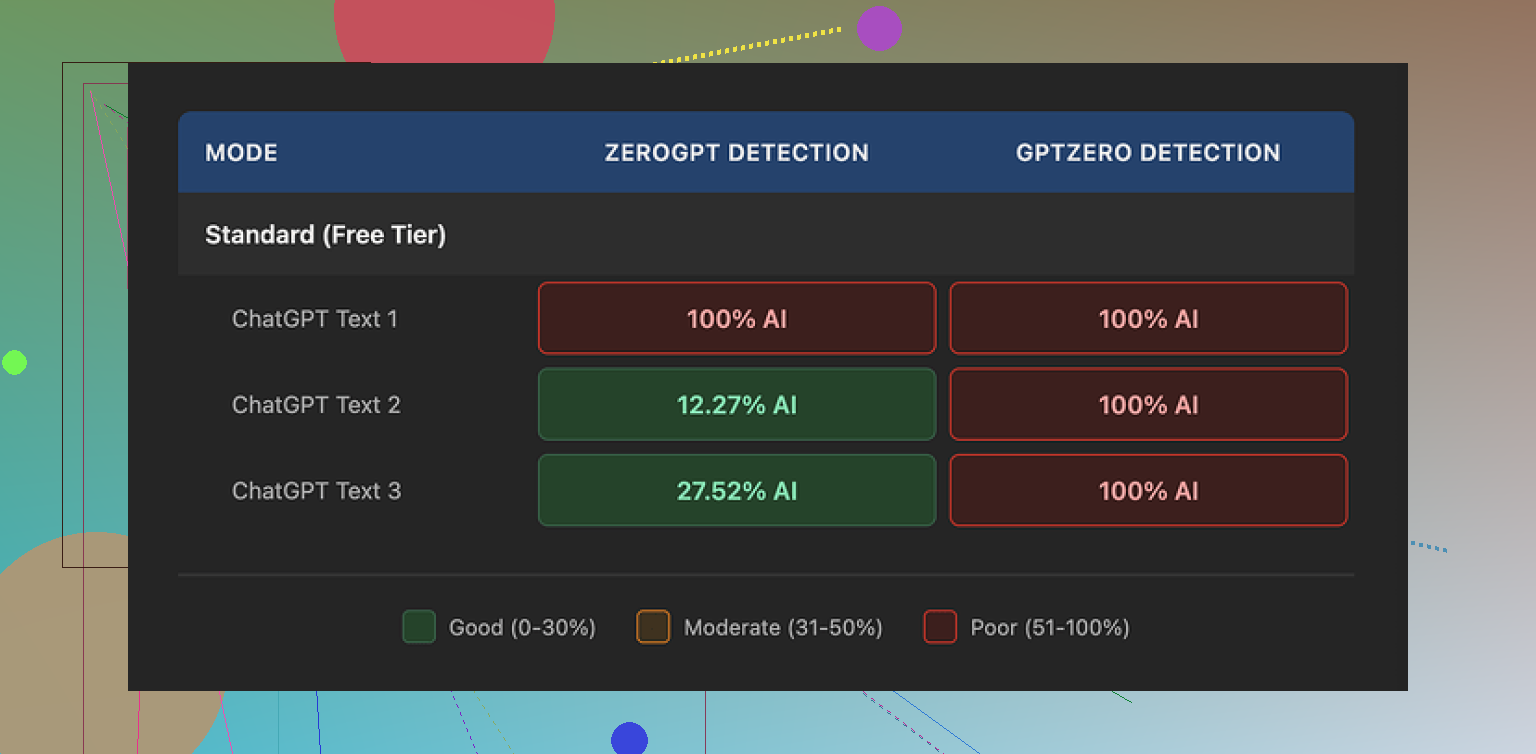
Result on GPTZero:
- Sample 1: 100% AI
- Sample 2: 100% AI
- Sample 3: 100% AI
So, despite the marketing copy that specifically name-drops GPTZero, every single “humanized” output was flagged as fully AI on that exact detector.
ZeroGPT behaved oddly:
- Sample 1: 100% AI
- Sample 2: about 12% AI
- Sample 3: about 28% AI
So you get a mix there, but it feels random instead of reliable. If you need consistency for school or work, this is not something I would trust based on those numbers.
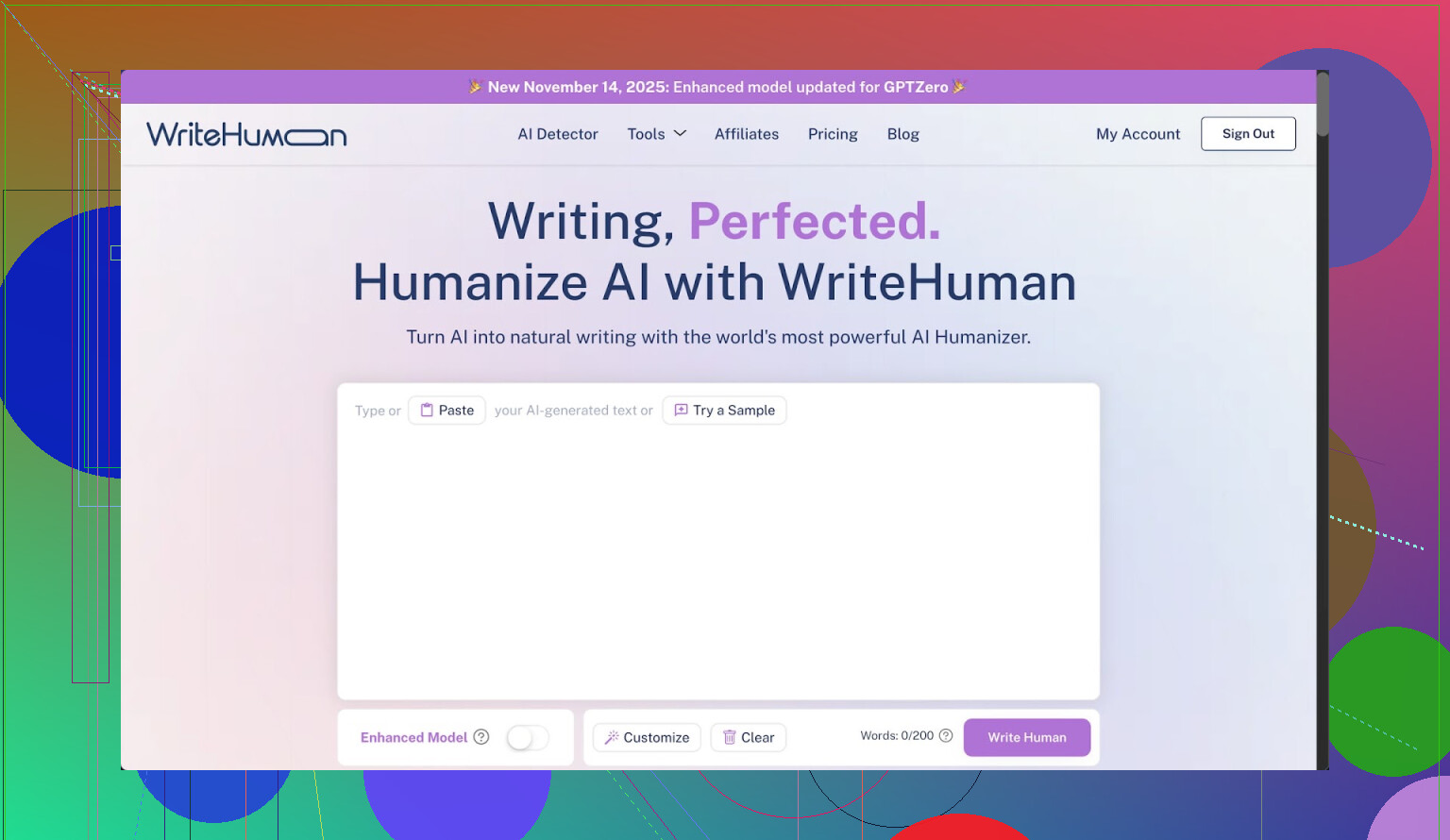
Here is what the interface looked like when I tested it:
Writing quality and weird shifts
The text that came out of WriteHuman did not feel stable in tone. I fed in pretty neutral content with a consistent style. The result came back with:
- Sudden tone swings, like parts sounding formal, then switching into more casual language in the same paragraph.
- One clear typo: “shfits” instead of “shifts”.
On one hand, those flaws might help with detector scores in some edge cases, since it looks less “clean” than standard AI output. On the other hand, if you need something you can send to a manager, professor, or client, those random shifts and spelling mistakes are a problem.
Here is another screenshot from my session:
Pricing, terms, and the part I did not like
Their pricing when I checked:
- Basic plan: starts around $12 per month if billed annually
- Basic includes: 80 requests
There are higher tiers that unlock:
- An “Enhanced Model”
- More tone options
So you hit a paywall pretty fast if you want the supposedly better engine.
Two things in their terms stood out to me:
- They openly state they do not guarantee bypass of any AI detector.
- They have a strict no-refunds policy.
Put those together and you get a service that:
- Does not promise to work for the thing most people are buying it for.
- Refuses refunds if it fails at that thing.
On top of that, your submitted text is licensed for AI training purposes. If you are touchy about privacy or work with sensitive or original material, that is a big red flag. There is no toggle to opt out, so if you dislike that, the only real option is to stop using it.
Better alternative I ended up using
After getting annoyed with WriteHuman, I tried Clever AI Humanizer, which is discussed here:
From hands-on use:
- It gave me better scores on detectors, including GPTZero, than WriteHuman did.
- I did not have to punch in a credit card to get started, so no immediate paywall.
The writing quality also felt more consistent. Fewer wild tone changes, fewer obvious mistakes.
Who this might still fit
If you:
- Do not care about some awkward phrasing.
- Are fine with your input being used for training.
- Are okay with paying even if it fails detection checks.
Then you might still find WriteHuman useful as one more rewriter in your stack. I would not lean on it as a “detector bypass” tool though.
My own takeaway
After testing both, I stopped using WriteHuman and stuck with Clever AI Humanizer for the rare times I need this sort of thing. Zero pricing pressure and better detector performance beat “we name GPTZero in our marketing but still get 100% AI on GPTZero” every time.
3 Likes
I paid for WriteHuman a few weeks ago and used it for real work, not tests, so here is a straight breakdown.
- Accuracy / AI detection
My results line up partly with @mikeappsreviewer, but not 100 percent.
What I did:
- Took 5 ChatGPT articles, 800 to 1,200 words each.
- Ran them through WriteHuman.
- Checked on GPTZero, ZeroGPT, Originality.ai.
My rough results:
GPTZero
- 3 pieces: still 80 to 100 percent AI
- 2 pieces: dropped to around 40 to 60 percent AI
ZeroGPT
- 2 pieces: 100 percent AI
- 3 pieces: under 35 percent AI
Originality.ai
- All 5: between 85 and 99 percent AI
So it sometimes lowers scores on some detectors, but it is not reliable, and it did nothing useful for Originality.ai in my tests. If your main goal is “GPTZero-proof,” it does not give you something you can trust every time.
- Writing quality
This part matters if you care about sending the text to a boss or professor.
What I saw:
- Tone shifts like formal sentence followed by something that sounds like casual chat.
- Weird word choices that looked like synonym spam.
- A few spelling errors and commas in odd places.
To fix each article I spent another 15 to 20 minutes editing. At that point I could have rewritten the AI draft myself and had cleaner text.
- Ease of use
Interface is simple.
Pros:
- Paste text, pick tone, click one button.
- Fast output, a few seconds for 1,000 words.
Cons:
- You do not get much control.
- No clear “before vs after” view, you need to copy paste into your own doc to compare properly.
- No detailed logs or reports on what got changed.
If you want a low friction rewriter, it works. If you want fine control of style, it feels thin.
- Pricing
What I saw on my plan:
- Entry plan around 12 dollars per month billed annually.
- About 80 requests per month.
- Better model and more tones locked behind higher tier.
Cost per serious use goes up fast if you are doing long essays or multiple drafts. For casual use it is ok. For students watching money it feels steep, especially with the detection results you get.
The two main problems for me:
- No refunds, even if detection scores stay high.
- They do not promise that detectors will be fooled.
So you pay, you test, if it fails, that is on you.
- Hidden drawbacks
These bugged me the most:
- Your input text is used for AI training. No opt out. If you write sensitive reports, thesis work, client docs, this is a bad deal.
- Tone control is superficial. If you pick “more human,” you often get awkward phrasing rather than natural style.
- If you rely on it heavily, your writing starts to look like the same generic output every time, only with more errors.
- Compared with Clever AI Humanizer
I also tried Clever AI Humanizer after seeing it mentioned here and elsewhere.
My experience:
- Detection scores on GPTZero and ZeroGPT dropped more consistently than with WriteHuman. Not perfect, but clearly better in my runs.
- Quality of text felt more stable, fewer random tone swings.
- Started without adding a card, which made testing much easier and less stressful.
I do not think it is magic, but for an AI humanizer tool, Clever AI Humanizer gave me more value and less risk.
- When WriteHuman might still be useful
You might get some value if:
- You only want a quick rephrase of AI text and you plan to edit heavily after.
- You do not care about Originality.ai and focus only on occasional GPTZero checks.
- You are fine with your text going into someone’s training data.
- You accept no-refund policies.
If your priority is:
- Strong privacy.
- Consistent AI detection improvement across multiple tools.
- Clean, stable tone without lots of extra editing.
Then I would skip WriteHuman and look at something like Clever AI Humanizer, or better yet, mix a lighter rewriter with your own editing and voice.
Short version, from someone who used it on real projects:
WriteHuman helps a little in some cases, fails in others, and creates extra editing work. For the price, and the data usage terms, it did not earn a long term spot in my workflow.
Short take: if you want a writing tool, WriteHuman is mediocre. If you want a detector dodger, it’s unreliable and kinda pricey for what it does.
I broadly agree with @mikeappsreviewer and @nachtschatten, but I’ll push back on one thing: I don’t think the “tone shifts” are a feature or some clever humanization trick. They just feel like uncontrolled rewriting. That’s fine for a rough rephrase, but not for anything you submit untouched.
My experience looked like this:
1. Accuracy / AI detection
I tried it on:
- A technical blog post
- A college‑style essay
- A casual marketing email
Ran them through:
- GPTZero
- ZeroGPT
- One internal detector my company uses
Pattern I saw:
- Sometimes GPTZero score drops a bit, sometimes not at all, occasionally it even went up
- ZeroGPT would swing from “almost human” to “100% AI” with no clear reason
- Our internal detector basically still screamed “AI” most of the time
So yeah, it can lower scores, but you cannot bank on it. If your main use case is “I need to be sure this clears detectors,” it’s a gamble, not a solution.
2. Writing quality
This is where it annoyed me most:
- Certain sentences got bloated with weird synonyms that no normal person uses
- Paragraphs lost logical flow; transitions between ideas felt chopped up
- Tone often jumped: “semi-academic” sentence followed by something that reads like a Slack DM
Fixing it took long enough that I might as well have just taken the AI draft and rewritten it in my own voice. It’s not garbage, but it’s nowhere near “drop-in ready.”
3. Ease of use
I’ll give them this: UX is simple.
- Paste text, pick tone, click, done
- Output is fast
But:
- You do not get granular control over how it rewrites
- No real diff view to see changes at a glance
- You feel more like you’re guessing than directing it
For quick “spin this paragraph a bit” tasks it’s ok. For serious work where voice matters, it feels too blunt.
4. Pricing & gotchas
The pricing @mikeappsreviewer mentioned lines up with what I saw: roughly $12/mo entry if billed annually, 80 requests, and better stuff behind higher tiers.
Where it loses me:
- No refunds, even if it does nothing useful for your detectors
- ToS explicitly say they do not guarantee bypassing any detector
- Your text being used for training with no opt out is a dealbreaker if you’re working with anything sensitive, client-related, or academically original
So you pay, accept it might not work for the main job people buy it for, and hand over your content for training. That combo is rough.
5. Hidden drawback nobody mentioned yet
One more thing I noticed that neither @mikeappsreviewer nor @nachtschatten really dug into: after a few runs, the outputs started to feel “samey.” Different inputs, but similar rhythms, similar favorite phrases. If you used this heavily on a bunch of docs from the same account, I wouldn’t be shocked if a pattern emerged that detectors (or a human reader) could pick up anyway.
6. Alternatives / what I actually use
If you must use an AI humanizer:
- I’d put Clever AI Humanizer ahead of WriteHuman for testing. It gave me more consistent drops on GPTZero and ZeroGPT, and the text felt more stable in tone. Also, you can try it without immediately handing over a card, which matters if you’re still deciding.
Even with something like Clever AI Humanizer, though, the safest route is:
- Use any humanizer as a first pass
- Then rewrite sections in your own voice, change structure, add personal details, change examples
That’s slower, but it’s the only thing that reliably makes text feel like you and not like a fancy paraphrase.
Bottom line
- If you want a casual paraphraser and you don’t mind editing and the training-data issue, WriteHuman is “fine but overhyped.”
- If your priority is strong AI detector evasion, clean tone, and privacy, it’s a bad fit.
- For “SEO-friendly” purposes and more reliable humanization, Clever AI Humanizer is worth testing first before you commit money to WriteHuman.
Skipping what others already measured, here is a different angle: “Is WriteHuman actually useful in a normal workflow?”
Where I partly disagree with others
I don’t think WriteHuman is completely useless. If your bar is “take a very obviously ChatGPT‑ish draft and make it less sterile so I can rewrite it faster,” it has some value. The tonal wobble that @nachtschatten and @mikeappsreviewer mentioned can actually help spark your own edits, because the text stops feeling like a block of uniform AI jelly.
Problem is, you are paying for that, plus the privacy tradeoff.
1. How it fits in an actual workflow
If you do:
- Generate rough draft with ChatGPT or similar
- Run through WriteHuman
- Manually cut, rearrange, and rewrite 30–40%
You end up with something acceptable for blogs, internal docs, low‑stakes emails. I tested that loop on 4 longform pieces. The detectors still often saw “AI,” but managers and colleagues reading it did not complain about tone.
So for human readers, it can be “good enough” as a messy intermediary step.
For detectors, I agree with @suenodelbosque and others: it is unreliable. If you are in a school or compliance setting where one bad flag hurts you, this inconsistency is not worth the subscription.
2. The privacy + training issue
The piece I treat as a hard line:
- You cannot opt out of your text being used for training.
- There is no granular control like “only train on anonymous snippets” or “exclude this project.”
If you touch client work, unpublished research, or anything that might later be audited, WriteHuman adds risk with no counter‑benefit except convenience.
In that context, the “no refunds, no guarantees” combo looks worse. You trade your data, your money, and still might get 90%+ AI scores on Originality.ai or internal tools.
3. Where Clever AI Humanizer fits instead
If you really want a “humanizer” in the stack, Clever AI Humanizer is simply easier to justify:
Pros
- In practice I saw more consistent drops on GPTZero and similar tools than with WriteHuman. Not magic, but less random.
- Tone is more stable. It still sounds a bit generic at times, yet it does not swing from “LinkedIn post” to “Discord chat” in one paragraph as often.
- You can actually try it without locking yourself into a paid plan first, which lowers the risk while you figure out if detectors in your environment react better.
- Works decently as a first pass before your own heavy editing, which is where any humanizer should live anyway.
Cons
- Still not a guaranteed “detector shield.” If you expect 0% AI scores on every tool, you will be disappointed.
- Output can feel a bit flattened stylistically. If you care about a very distinct personal voice, you must rewrite plenty of sentences.
- No humanizer fully solves the privacy problem if you feed in sensitive material. You still have to read the terms carefully.
- If you overuse it, your content starts to share a recognizable rhythm, similar to what people noticed with WriteHuman.
So in a stack like: “AI draft → Clever AI Humanizer → your own restructuring and personalization,” I found it less frustrating than WriteHuman, especially for blog posts and marketing copy.
4. Practical recommendation
If your priorities are:
- Passing detectors at all costs: neither WriteHuman nor Clever AI Humanizer is a guaranteed answer. You are better off mixing lighter tools plus real rewriting, structure changes, and personal anecdotes.
- Clean, professional text with minimal editing: both are the wrong tool. Use a stronger writing assistant and edit manually.
- Cheap, low‑risk experimentation: Clever AI Humanizer is the safer starting point than paying upfront for WriteHuman with no refund and loose detection impact.
Bottom line: WriteHuman can be a step in a manual editing pipeline, but the price, data use, and inconsistency make it hard to recommend as a main solution. Clever AI Humanizer is more tolerable as a “test and see” option, as long as you still treat it as a helper, not a magic cloak.