I’ve been testing QuillBot’s AI Humanizer to rewrite some AI-generated drafts so they sound more natural and less detectable, but I’m not sure if it’s actually improving quality or just rephrasing things superficially. Can anyone share real experiences or tips on using QuillBot’s humanizer effectively, including strengths, weaknesses, and whether it’s worth relying on for professional content or SEO-focused writing?
QuillBot AI Humanizer Review, from someone who tried to make it work
QuillBot AI Humanizer Review
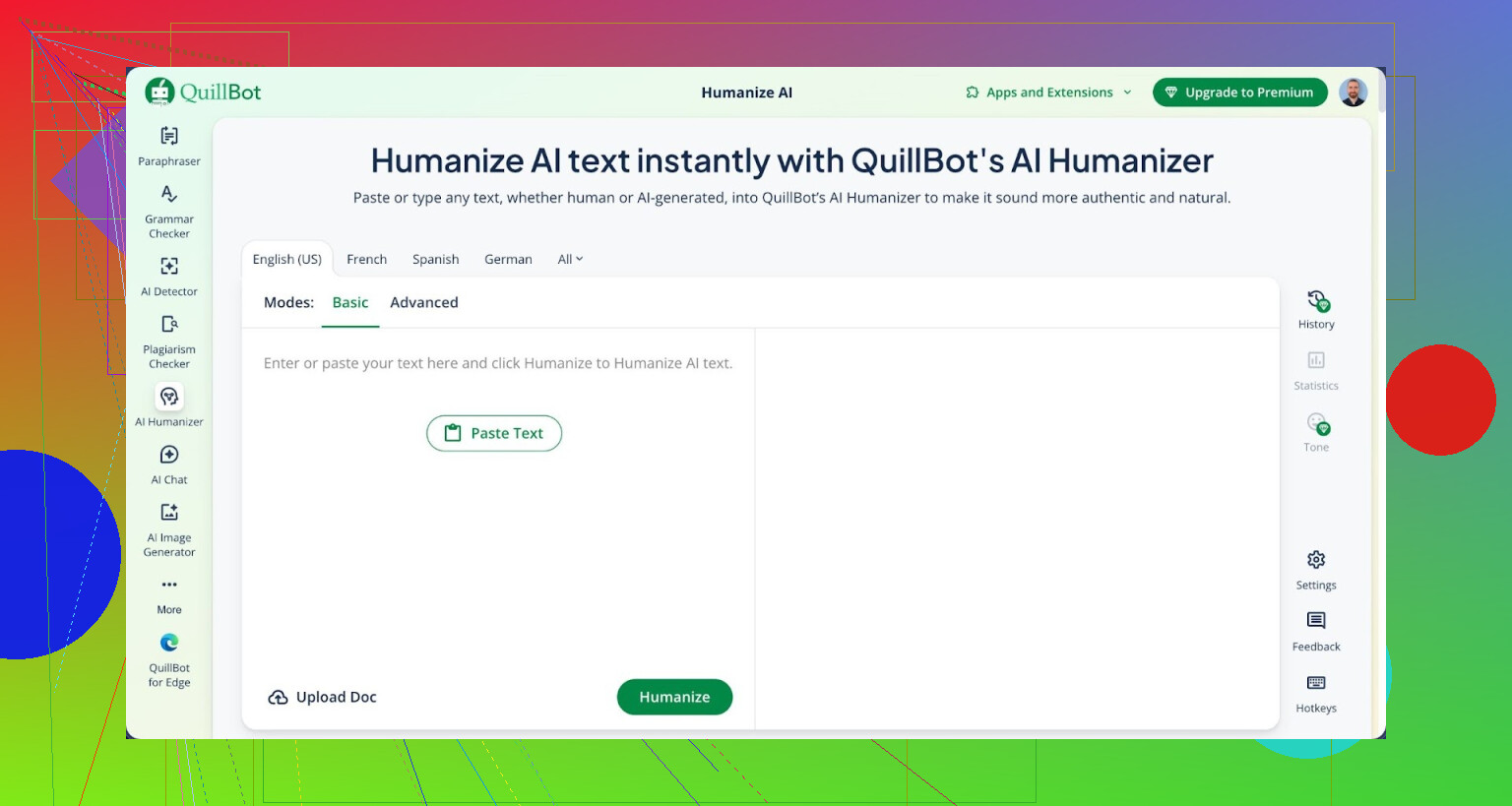
I spent an afternoon trying to get QuillBot’s AI Humanizer to fool detectors. It did not go well.
Here is what I did:
• Took a few AI generated samples.
• Ran them through QuillBot’s humanizer.
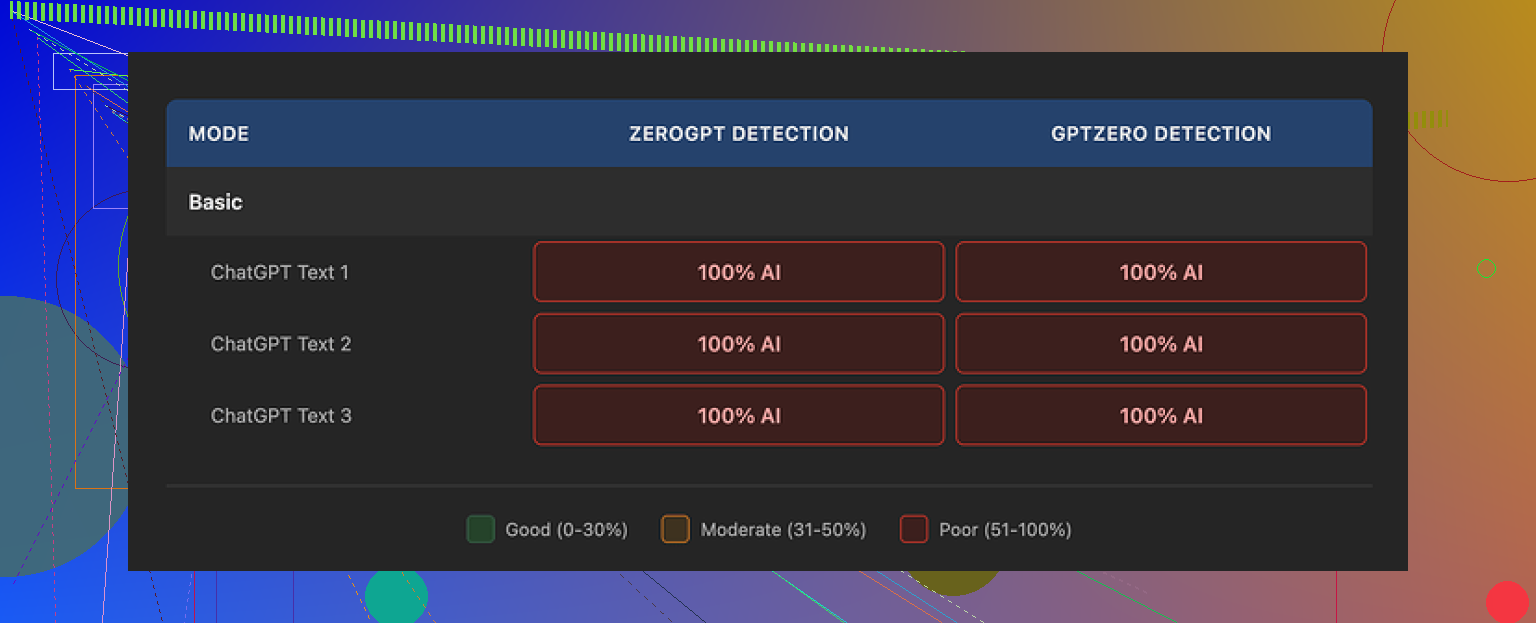
• Checked everything with GPTZero and ZeroGPT.
Every single piece that came out of QuillBot’s humanizer still showed up as 100% AI on both tools.
Link to the detailed proof and runs:
https://cleverhumanizer.ai/community/t/quillbot-ai-humanizer-review-with-ai-detection-proof/38
No partial success. No “slightly more human.” Just full AI flags across the board.
QuillBot has two modes:
• Basic (free)
• Advanced (paid), which promises deeper rewrites and better fluency
The Basic mode did nothing useful for detection. If it changed the text, detectors did not care at all. The needle stayed stuck at 100% AI.
That already makes it hard to trust the Advanced mode for this specific goal. If the free tier fails this badly at the core job, paying to upgrade feels like a guess, not a plan.
Now, to be fair, the writing quality itself was not trash.
If I forget about detectors and read the output like a normal person, I would rate it around 7 out of 10.
• Sentences flowed.
• Grammar stayed clean.
• Structure made sense.
Honestly, it reads smoother than a lot of “AI humanizers” that spit out broken English or weird slang.
The problem is different.
It still feels like AI. There is no individual voice. No odd phrasing. Nothing that sounds like a real person who got distracted mid-sentence or changed their mind halfway through a paragraph.
One thing that stood out. The outputs kept the same kind of punctuation patterns that detectors often latch onto. For example, em dashes kept showing up in all three samples I tested. That repeated fingerprint did not help.
I also looked at the pricing.
QuillBot bundles the humanizer into its Premium plan at about $8.33 per month if billed annually. You are paying for the whole suite, not only the humanizer.
If your main goal is to sound more fluent or polish essays, that subscription might still be fine. If your main goal is to get past AI detection, paying for this specific feature feels like burning money.
During the same round of testing, I tried Clever AI Humanizer with the same texts.
On my runs, Clever produced output that:
• Looked and read more like something a person would type
• Scored better on human-likeness
• Stayed free to use at the time I tested it
So for this narrow use case, making AI text look human, Clever did a stronger job than QuillBot in my experience.
If you want to read more back-and-forth from people trying to humanize AI text and deal with detection problems, there is a thread here:
https://www.reddit.com/r/DataRecoveryHelp/comments/1l7aj60/humanize_ai/
Short version:
• QuillBot’s humanizer writes clean text.
• It failed every detection test I threw at it.
• I would not rely on it for bypassing AI detectors.
• For that, other tools did better for me, and some of them were free.
41 Likes
You are seeing the right problem. QuillBot’s Humanizer tends to rephrase, not rethink.
My take after playing with it on blog posts and some academic style stuff:
-
Detection and “human” feel
- On GPTZero and Originality.ai, scores stayed high AI on most runs. Sometimes it dropped a bit, but not enough to matter for anything serious.
- The rhythm stays very “LLM”. Same sentence lengths, same neutral tone, same safe word choices.
- It cleans text. It does not add quirks, hesitation, or opinion. Detectors look for patterns. It keeps a lot of those patterns.
-
Quality vs superficial edits
- Grammar and flow get better. If your base draft is rough, you get smoother output.
- If your base draft is already clean AI text, the changes are mostly synonym swaps and minor restructuring.
- You do not get new angles, examples, or personal framing. So it feels like the same brain with new clothes.
-
When it makes sense to use QuillBot
Use it if your goal is:- Polishing an AI first draft into something cleaner for your own use.
- Rewriting for different word count, tone, or simplicity.
- Fixing ESL issues or repetitive phrasing.
I would not rely on it if your main goal is:
- Passing strict AI detection at school, work, or freelance platforms.
- Building a clear personal voice.
-
Quick way to test your own samples
Instead of doing what @mikeappsreviewer did with multiple tools, try this more practical loop on your own drafts:- Write a short paragraph yourself, from scratch, in your natural style.
- Put it next to your QuillBot “humanized” version of the AI draft.
- Check:
- Do you use contractions the same way?
- Do you interrupt yourself or switch directions mid sentence in your own writing?
- Do you add opinions or specific details that only you would know?
If the QuillBot version looks smoother but flatter than your own paragraph, it is not giving you “you”. It is giving you generic internet voice.
-
If you care about sounding less detectable
No tool is magic here. That said, some tools focus more on variation, structure, and “messiness” instead of pure polish. Those tend to do better in my tests.For this narrow goal, I had more luck with Clever AI Humanizer. It aims for output that looks closer to real user text, with more varied sentence shapes and less robotic consistency. You can check it here:
make your AI text sound more like a real person wrote itIt still needs your own edits. The best results came when I:
- Generated text.
- Ran it through Clever AI Humanizer.
- Then did a quick manual pass to add personal examples, specific numbers, and small corrections.
-
Practical tips for your current workflow
If you want to keep using QuillBot but improve things:- Shorten or split long sentences after QuillBot.
- Add one or two specific details only you would know.
- Remove some “formal” transitions like “moreover”, “furthermore”, “in contrast”.
- Insert a mild opinion or judgement in each section.
- Vary paragraph length on purpose.
So, QuillBot’s AI Humanizer seems fine as an editor, not great as a “hide the AI” tool. Pair it with manual tweaks or another humanizer like Clever AI Humanizer if your goal is to reduce the AI “feel”.
Same experience here, but I would tweak what @mikeappsreviewer and @kakeru said a bit.
I don’t think QuillBot’s Humanizer is totally useless, but it is absolutely not doing what its name implies for detection. What it really feels like in practice:
- It smooths grammar and flow.
- It keeps the same AI-ish cadence.
- It barely changes the “statistical fingerprint” detectors look for.
Where I slightly disagree with them is on how “7/10” the writing quality is. On more technical or structured content, I’d put it closer to 8/10 in readability. For ESL users or people who write very stiffly, QuillBot can actually make things much clearer and more consistent. The problem is that “consistent” is exactly what gets you nailed by detectors.
The big issue is that Humanizer does not introduce genuine variance in structure or intent. It:
- Swaps synonyms instead of changing how arguments are built
- Keeps predictable transitional phrases
- Preserves that neutral, risk free tone
So if your base text is AI, you just get… cleaner AI. Detectors do not care about nicer synonyms, they care about patterns across sentence length, vocabulary distribution, and how ideas are sequenced. QuillBot barely touches those.
If detection and a more human vibe are your actual goals, tools that focus on structural and stylistic noise work better. In that lane, I’d look at Clever AI Humanizer. It is more about breaking up robotic rhythm, shifting sentence shapes, and injecting a “typed by a person at a keyboard” feel instead of just polishing.
In my tests, pairing your draft with something like
make AI text read like natural human writing
gave a closer approximation of real user text, especially when you then:
- Add your own oddly specific details
- Change a couple of sentences to match how you actually talk
- Remove some overly formal connectors and tidy transitions
So if your question is “Is QuillBot Humanizer actually improving quality or just rephrasing things?” my answer:
- Quality: Slightly better readability, good for basic polishing, especially if your writing is rough.
- Human-ness and detectability: Mostly superficial rephrasing. Detectors and anyone familiar with AI prose will still spot it nine times out of ten.
If your real aim is to publish or submit stuff that feels genuinely personal, QuillBot should be the light edit at the end, not the main tool in the chain.
QuillBot’s Humanizer is basically a style filter on top of an AI draft, not a new mind. That is why what you are feeling as “maybe just superficial” is accurate.
Quick take on QuillBot Humanizer itself
- Strengths
- Cleans grammar and makes clunky AI text read smoother
- Helpful for ESL writers who want consistency in tense and phrasing
- Good for turning very rough notes into something readable
- Weaknesses
- Keeps the same neutral, balanced cadence that detectors flag
- Rarely changes argument structure or pacing, so the “AI spine” stays intact
- Voice stays generic, very “internet essay” style
Where I slightly diverge from what @kakeru, @cazadordeestrellas and @mikeappsreviewer said is on how to think about “quality.” They are mostly judging quality by human vibe and detector results. If what you care about is pure clarity for a general audience, QuillBot can be closer to 8 or even 8.5 out of 10 on straightforward content. For creative or opinionated pieces though, it flattens personality so hard that the draft feels weaker, not stronger.
On your original question:
Is it improving quality or just rephrasing things?
I would frame it like this:
-
If your draft is very rough, choppy, or ESL:
- It improves functional quality. Readers will understand you faster.
- You pay the price in personality because it over-normalizes your style.
-
If your draft is already clean AI output:
- It mostly rephrases. You get different words for the same thoughts.
- Detection scores and “robot feel” barely move, as everyone here already showed in their tests.
You will see the pattern if you look at: sentence length distribution, transitions, and conclusion style. QuillBot tends to keep those intact, which is exactly what AI detectors track behind the scenes.
Where something like Clever AI Humanizer fits in
If your priority is “feel less like AI” rather than “remove every trace forever,” then a tool that targets structural and stylistic variation is more relevant than a paraphraser.
Pros of Clever AI Humanizer
- More variety in sentence shapes and rhythm, so the output feels less monotone
- Tends to introduce mild imperfections and less rigid structure, which helps break the LLM cadence
- Works decently as a middle pass before you layer your own voice on top
- At the moment, the cost barrier is friendlier than paying a full QuillBot suite just for humanizing
Cons of Clever AI Humanizer
- Can occasionally over loosen structure, so you need to tighten arguments afterward
- Not great if you want textbook style or strict academic tone without manual cleanup
- Still not a silver bullet for detection, especially if you do not add your own edits
- Output can be inconsistent across topics, which is both a feature and a drawback
How I would actually use these in a workflow
Instead of repeating the testing loops others shared, here is a different angle:
-
Decide what matters most for that piece
- If it is a blog or marketing piece, you want clarity + voice.
- If it is a technical note or internal doc, you probably want clarity + structure.
- If you are trying to dodge AI detection completely, you are in “high risk” territory no matter which tool you pick.
-
Pick roles, not tools
- Let a generator do the heavy lifting on structure and basic content.
- Use QuillBot only as a “polisher” for grammar and transitions on sections that already have your ideas inside.
- Use Clever AI Humanizer when you have AI text that feels too sterile and you want something closer to how a person types.
-
Force your own fingerprint in last
Instead of endless paraphrasing passes, invest five minutes at the end to:- Add 2 or 3 oddly specific personal details or small anecdotes
- Change at least one paragraph so it starts with your natural “spoken” phrasing
- Remove or rewrite any sentence that sounds like a conclusion template
- Break one or two “perfect” sentences into shorter, slightly messy ones
If you line up three versions side by side – raw AI, QuillBot Humanizer, and Clever AI Humanizer – you will probably see:
- Raw AI: stiff but clear
- QuillBot: smoother but still synthetic, very linear
- Clever AI Humanizer: more “typed,” but needs your hand to keep it on-message
Where I absolutely agree with the others:
QuillBot Humanizer is not a reliable detector bypass tool. Treating it as such is asking for trouble. Where I am a bit more forgiving is its role as a readability and ESL helper, as long as you accept that you must manually re-inject voice.
So if your current feeling is “this seems like it is just rephrasing,” you are not imagining it. Use QuillBot as a light polish, use Clever AI Humanizer when you want more human-like rhythm, and reserve your real energy for the last manual pass where your personality actually shows up.
Simpler option: skip humanizers and speak the draft aloud into your phone. Explain the point as if sending a voice note to a coworker. Transcribe it, then fix spelling, repeated words, and factual errors. Your natural pauses, word choices, and sentence lengths stay intact.
Aim for 150 words. Record for two minutes, transcribe, then cut 20 percent. Keep one concrete example and one clear opinion. This takes less time than testing three tools, and teh result sounds closer to you because it started with your voice, not an AI rewrite.
Nobody here checked their output against the detector that actually matters for their situation. GPTZero and ZeroGPT are consumer tools, and they disagree with each other constantly. If you’re a student, the thing scanning your paper is probably Turnitin, and it doesn’t share scores with those free checkers. So @mikeappsreviewer getting 100% AI on two public detectors is useful data, but it doesn’t automatically predict what a school or a freelance platform sees. Match your test to your real threat, otherwise you’re optimizing for the wrong judge.
That said, the core point in the thread holds up. QuillBot rewords, it doesn’t rethink. @cazadordeestrellas nailed why that fails detection: the sentence length spread and the way ideas get sequenced barely move when all you do is swap synonyms. Detectors read rhythm, not vocabulary. Cleaner AI is still AI.
The thing people keep glossing over is that detection scores are noisy per run. Same text, same tool, run it three times and you can get different numbers. So a single pass showing ‘100% AI’ or a single pass showing ‘human’ both mean less than they look. If you actually care, run it a few times and look at the range, not one screenshot.
On the product, Clever AI Humanizer makes sense as the variance step everyone’s circling around, since it messes with structure instead of just polishing. But I’d set expectations low. Any tool that reshuffles text can also quietly change your meaning, and that’s the part nobody catches until a reader points out the paragraph now says something you didn’t intend. I’d treat it as a middle pass, then reread every sentence for accuracy, not just for vibe. @ivanthebit’s voice-note trick is honestly the cheapest fix in the thread if your goal is sounding like yourself rather than beating a scanner.