I’ve been testing a few free paraphrase AI tools for rewriting blog posts and social media content, but I’m worried they sound stiff or robotic and might hurt readability and SEO. Has anyone found a free paraphrasing AI that feels natural enough for real readers while still being good for search rankings? I’d really appreciate specific tool recommendations or tips on how to use them without getting penalized or losing my voice.
QuillBot used to cover what I needed, then they locked tones and styles behind a subscription. After that change I stopped bothering with it.
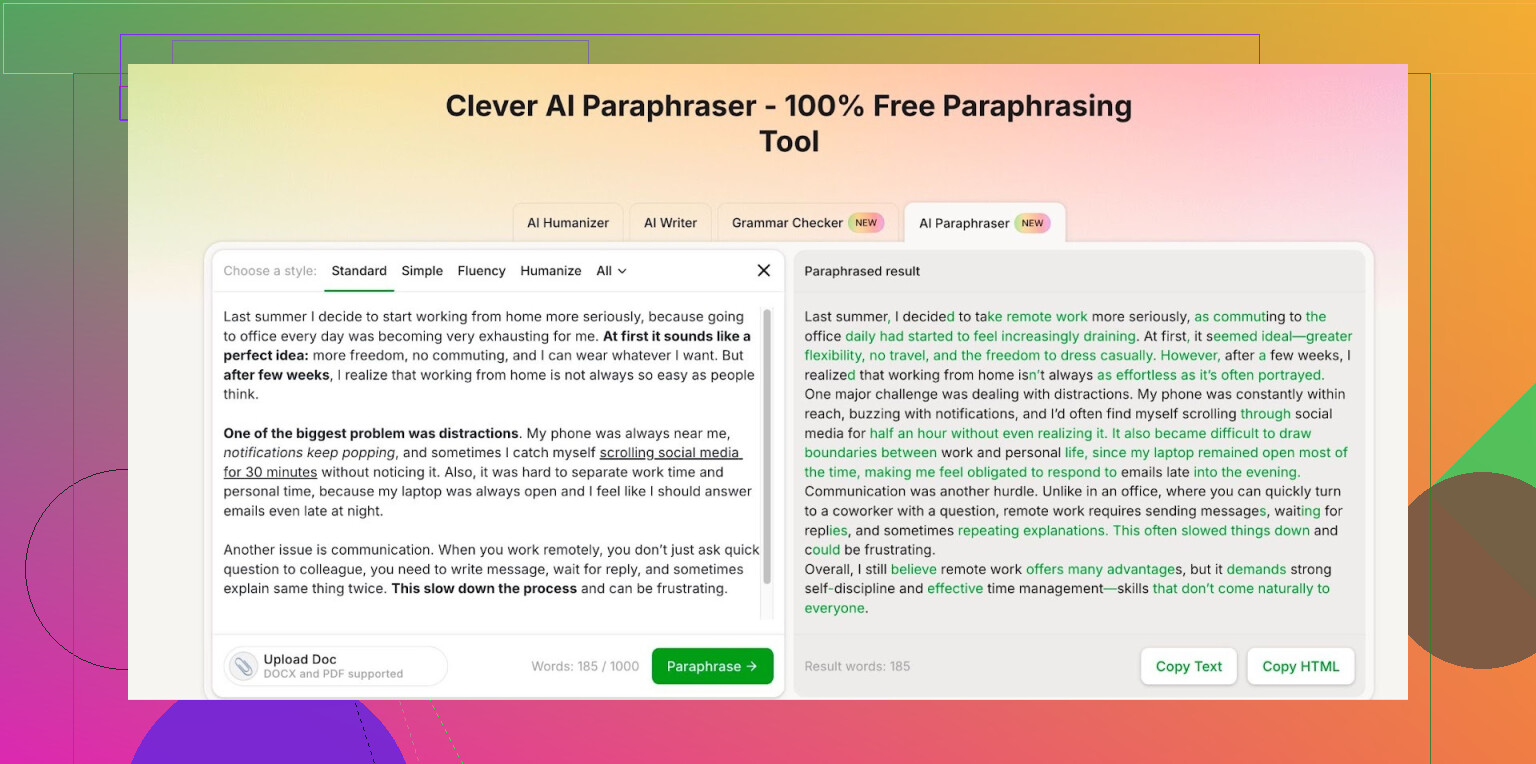
I went looking for something else and ended up using Clever AI Humanizer’s Free AI Paraphraser here:
My notes after a few weeks:
• The output feels close enough to QuillBot for my use. Sometimes it sounds a bit more current in phrasing, so I assume they are using newer models or tuning. Hard to prove, I just compare side by side.
• You get access to different styles without paying, which is what pushed me away from QuillBot in the first place.
• After logging in, the free tier shows 7,000 words per day and 200,000 words per month. I write daily and I have not hit the cap yet. For context, that covered multiple long reports plus a bunch of smaller rewrites.
• I still read through and fix weird sentences. It is not fire and forget. But it saves time on first drafts and rewrites.
If you are doing light to medium volume paraphrasing for work or school, those limits are likely enough. If you need bulk rewriting for a whole site or agency-level output, you will hit the ceiling and need something else or multiple accounts.
I stopped paying for QuillBot after this switch. For what I do, this free paraphraser is enough:
https://cleverhumanizer.ai/paraphrase-tool
10 Likes
Short answer, free paraphrase AI is worth it only if you treat it as a helper, not a replacement for your voice.
I agree with @mikeappsreviewer on one thing. Paid tools locking basic styles is annoying. I do not fully agree that “QuillBot-level” is enough by itself though, especially for blog and SEO work. For social posts, sure. For long articles, you need more control.
Here is what has worked well for me with free stuff, without sounding robotic or getting wrecked by SEO checks:
-
Use AI only on chunks
Take 2–4 sentence sections and paraphrase those, not full articles. Long inputs tend to come out more stiff and generic. -
Keep your own hook and CTA
Write your intro and conclusion yourself. Let the paraphraser help on middle paragraphs. That keeps your tone and intent. -
Use “humanizing” rather than raw paraphrase
Clever Ai Humanizer is decent for this. I use it in two ways:
• First pass: rewrite for clarity in a neutral style.
• Second pass: “humanize” or set a more casual tone for social content.
That combo gives output that reads less robotic than most free spinners. -
Check with simple tests
• Read it out loud. If you would not say it, edit it.
• Look for odd synonyms, like “commence” instead of “start”. Replace those.
• Run it through a free readability checker and aim for about grade 6–8 for most blog posts. -
Keep SEO signals intact
Paraphrasers sometimes drop or overstuff keywords. I usually:
• Add my main keyword back in exactly a few times per section.
• Keep internal links and headings written by hand.
• Avoid paraphrasing anchor text, especially branded terms. -
Watch for factual drift
AI tends to change numbers and qualifiers. If your post has stats like “27%” or specific dates, lock those in before you paraphrase and check them after. -
Speed workflow that works for me
• Draft messy in your own words.
• Send only clunky sentences to a paraphraser like Clever Ai Humanizer.
• Paste back, then do a quick human edit pass.
This keeps your tone and still saves time.
From tests on a few sites I run, posts where I used AI only for sentence clean up had better engagement than posts that were fully rewritten. Time on page and scroll depth were higher, bounce slightly lower. So partial use seems safer for SEO and readability.
So yes, free paraphrase AI is “worth it” if you:
• Use it on pieces, not whole posts.
• Combine it with your own edits.
• Keep critical SEO parts under manual control.
If you expect any free tool to rewrite an entire blog in one click and still sound natural, it will feel robotic sooner or later.
Short version: free paraphrase AI is worth using, but not worth trusting.
I’m mostly on the same page as @mikeappsreviewer and @cazadordeestrellas, but I’ll push back on one thing: the problem isn’t just “how” you use the tools, it’s what you expect them to do in the first place.
If you’re trying to:
- Turn a mediocre draft into a polished, on-brand, SEO‑smart article with one click
- Or mass‑rewrite posts to “beat” duplicate‑content checks
…then yeah, it’s going to sound robotic and eventually tank engagement. Free or paid, doesn’t matter.
Where free tools actually shine:
-
Micro‑rewrites, not macro‑rewrites
Everyone’s saying “use chunks,” which I agree with, but I’d go even smaller. Sometimes I only paraphrase one sentence I keep rewriting badly. That keeps the overall post 90% “you” and 10% AI polish. Less detectable, less stiff. -
Idea reshaping instead of sentence spinning
Instead of pasting a paragraph and asking it to paraphrase, try:- “Shorten this to 1–2 sentences without losing the main point”
- “Make this less formal but keep the same structure”
Those tend to feel a lot less robotic than pure synonym swaps.
-
Contrast check
One trick: paraphrase a paragraph, then compare your version to the AI’s and manually merge. Take 1–2 phrases that work, ditch the rest. It’s a writing partner, not a ghostwriter.
On tools:
I’ve tested a bunch of free ones, and I’ll reluctantly admit Clever Ai Humanizer is one of the few that doesn’t instantly scream “spun article.” It’s actually decent when you use it as a clarity tool first, then a tone adjuster. If you care about SEO, that “humanizer” angle is useful because it tends to keep phrasing more natural and less keyword-soup compared to older spinner-style tools.
Where I slightly disagree with the others:
- I wouldn’t lean too hard on any paraphraser for long-form blog SEO. Google is getting better at spotting pattern-y, formulaic text, even when it’s “unique.” Your structure and intent matter more than just rephrased sentences.
- Social posts are actually riskier than people think, not for SEO, but for brand voice. If all your tweets/threads/LinkedIn posts read like the same generic AI voice, users will tune out faster than Google will.
Quick sanity checks I use that haven’t been mentioned:
- Compare your AI-edited paragraph to something from a popular blog in your niche. If yours reads like a sterile manual next to it, redo it.
- Check sentence rhythm. If every sentence is similar length and pattern, that robotic feel goes through the roof. Manually break one into a short punchy line, combine another into a longer one.
My rule of thumb:
- Blog posts: AI < 30% of the words, and never the intro, subheads, or conclusion.
- Social: AI can help with variants and trimming, but final wording is always hand-tweaked.
- SEO: keep your keyword strategy, headings, and internal links fully human. Let tools like Clever Ai Humanizer help with readability, not strategy.
If you stick to that, then yeah, free paraphrase AI is “worth it.” If you’re hoping it’ll write your content for you and still sound natural, you’ll hit that robotic wall pretty fast.