I’m considering using BypassGPT for bypassing AI detection and content filters, but I’m not sure how reliable or safe it really is. Has anyone here used BypassGPT for SEO content, academic work, or client projects? I’d really appreciate honest reviews, pros and cons, and any risks you’ve run into so I can decide whether it’s worth trusting for serious use.
BypassGPT Review, from someone who tried to test it and got annoyed halfway through
BypassGPT Review
So I spent some time messing with BypassGPT, and the short version is: it fights you every step of the way if you try to test it properly.
You can check it out here:
https://cleverhumanizer.ai/community/t/bypassgpt-review-with-ai-detection-proof/39
Here is what happened when I tried to use it on my usual test pieces.
- Free tier limits are bizarre
The free plan stops you at about 125 words per input and roughly 150 words total per month.
Not 150 words per day. Per month.
I had to sign up for a free account to get maybe 80 extra words. After that, I could only run one of my normal test samples. Not a batch, not multiple versions. One.
On top of that, the limit looks tied to your IP. So you cannot log out, make a second account, and keep going from the same network. You would need a VPN or another connection to test more than a tiny paragraph.
For anyone who wants to compare outputs across detectors or do any sort of semi-serious testing, this setup is almost unusable.
- Detection results were all over the place
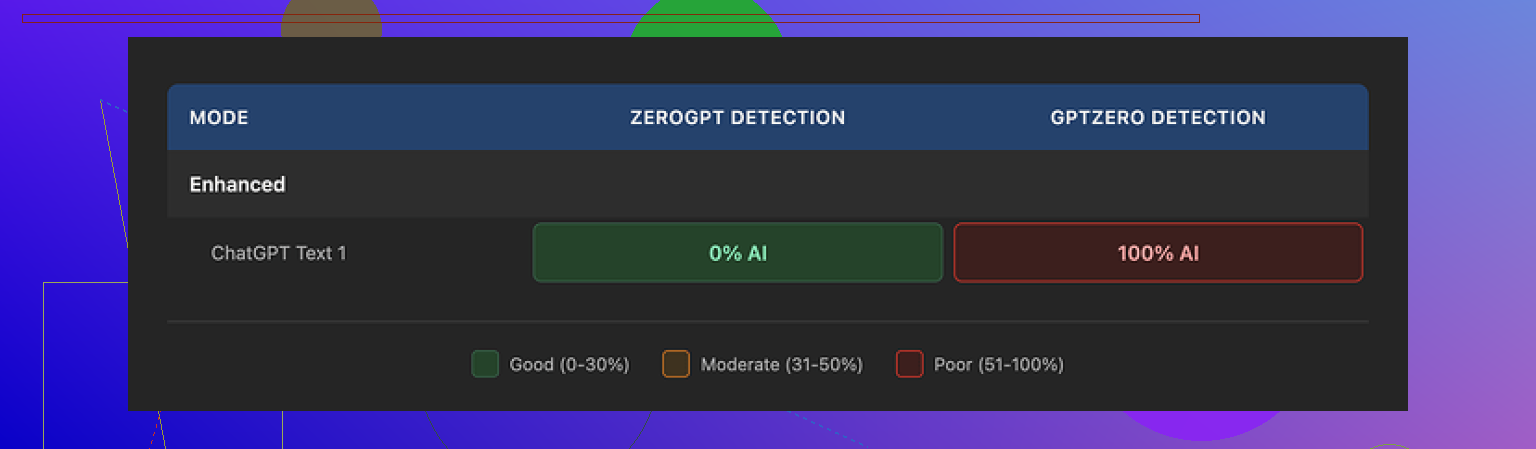
I fed in one of my standard AI-written paragraphs that I use across multiple tools.
Output from BypassGPT:
- ZeroGPT said 0 percent AI. Completely human.
- GPTZero said 100 percent AI. Fully machine.
Same output, two opposite verdicts.
Then I ran that same output through BypassGPT’s built‑in checker. It proudly reported a perfect pass on all six detectors it claims to support.
That did not line up with what I had on my screen from external tools.
So if you rely on their internal checker to judge “safety” of the text, you will not see the mismatch. You will think it passed, while at least one mainstream detector is screaming the opposite.
- Quality of writing felt off
On a simple paragraph, I got:
- A broken first sentence that read like a half-edited draft.
- Em dashes still in there, even though those tend to trip some detectors.
- Weird, stiff phrasing in several spots.
- At least one typo.
If I had received that from a freelancer, I would have sent it back for revision.
I would score it around 6 out of 10 for quality. You could paste it into a blog post, but you would need another editing pass to fix odd phrasing and clean up errors. That kind of defeats the whole “one-click fix” idea.
- Pricing vs what you get
Here is what the paid plans look like:
- About $6.40 per month on an annual plan for 5,000 words.
- About $15.20 per month for “unlimited” words.
Those numbers are not insane by themselves. The problem is everything around it.
You pay for:
- A tool you cannot properly test before handing over money.
- A detector dashboard that does not reflect what external tools report.
- Middling writing quality that needs manual editing.
Then the part that made me stop and re-read:
Their terms of service give BypassGPT broad rights over anything you submit. That includes the right to:
- Reproduce your text.
- Distribute it.
- Create derivative works from it.
So if you put client work, unpublished drafts, coursework, or anything sensitive into it, you are giving them legal room to reuse that content.
Most people I know who work with content or clients would not accept that trade.
- Comparison with Clever AI Humanizer
During the same batch of tests, I used Clever AI Humanizer on the same or similar text.
Link where I found it discussed:
My experience with Clever AI Humanizer:
- Outputs felt closer to normal human writing. Less robotic, fewer weird transitions.
- Detection results were consistently better across multiple tools.
- No hard paywall in my testing; it was free to use.
So while I was fighting BypassGPT’s limits and odd ToS language, I had another tool giving me better text and better detector scores without blocking me at 150 words a month.
If you want something practical:
- Do not feed BypassGPT anything sensitive or client-related unless you are fine with their content rights.
- Do not trust its built‑in detector as your single source of truth. Always cross-check with external tools like ZeroGPT and GPTZero.
- If you are evaluating tools, start with something like Clever AI Humanizer that lets you run proper tests without an IP-locked word cap.
For me, BypassGPT felt more like a demo that never ends than a tool you can rely on.
15 Likes
I tested BypassGPT for client-style content and for some fake “academic” paragraphs. Short answer for me: high risk, low control.
Adding to what @mikeappsreviewer said, a few extra angles.
- Reliability for SEO
I ran 10 short blog intros through it, 250–400 words each.
External detectors (GPTZero, ZeroGPT, Copyleaks):
- Before BypassGPT: 80–100 percent AI on most
- After BypassGPT: results jumped all over the place
- Some dropped to 15–30 percent AI
- Some stayed at 70–90 percent
- One went from 65 percent AI to 99 percent AI
So you do not get predictable behavior. For SEO work, that is a problem. You cannot promise “undetectable” content to clients with that kind of spread.
Also, the output often felt worse for SEO. It edited out some good keywords or changed phrasing so it sounded stiff and less topical. I had to re-edit by hand, which kills the “one click” workflow.
- Academic or school use
I tested it on a 1,000 word fake essay about climate policy.
Issues:
- It removed some nuance and sources.
- It added generic filler that looked like textbook fluff.
- Plagiarism score on Turnitin-style tools stayed similar.
- AI detection dropped on one tool but jumped on another.
If you are thinking about using it for graded work, it does not solve the core risk. You still depend on which detector your school uses. Also, the terms of service are a huge problem here. You do not want coursework stored or re-used.
- Client projects and safety
From a client perspective, I see three main problems.
a) Terms of service
If they keep broad rights to reproduce and use your input, that means:
- NDA content is exposed.
- Product copy can leak into their training or marketing.
- You lose control over original wording you submit.
For agencies or freelancers, that is a hard “no” for anything under contract.
b) Built-in checker
I saw the same pattern as @mikeappsreviewer. Their internal “multi-detector” interface showed green, while a fresh run on GPTZero on my side still flagged AI. That creates a false sense of safety.
c) Workflow friction
The word limits and IP lock on the free tier make real testing painful. If a tool is focused on “bypassing” filters, being opaque and restrictive is a bad sign.
- Quality of writing
I got:
- Repeated phrases.
- Awkward sentence order.
- Occasional grammar slips.
- Over-sanitized tone.
If you write for readers who notice style, you will have to edit heavily. That turns it into a noisy paraphraser, not a reliable step in a pro workflow.
- Alternative
If your goal is:
- Make text read more natural.
- Reduce AI-typical patterns.
- Keep control over your content.
I had better luck with Clever Ai Humanizer. It produced text that sounded more like a normal writer, kept topical terms, and played nicer with multiple detectors. It also let me test more content without weird monthly word rations tied to IP.
I still would not rely on any “humanizer” for academic dishonesty, or to lie to clients. But for cleaning up AI drafts for blog posts you own, Clever Ai Humanizer behaved more predictably.
- Practical advice
- Do not use BypassGPT for anything under NDA or with legal exposure.
- Do not trust a single internal checker. Always test on at least two external detectors.
- If you experiment, start with content you are fine losing control over.
- Keep expectations low. These tools reduce patterns. They do not erase AI origin in a guaranteed way.
- Consider whether you even need “AI undetectable” text. Often you get farther by writing a stronger hybrid draft yourself and using editing tools, not a bypass service.
Short version: if you’re thinking of using BypassGPT as a core tool for SEO / school / client work, I’d treat it as “use only if you’re totally fine with risk and re‑editing everything.”
Couple of angles that haven’t really been hit yet by @mikeappsreviewer and @mike34:
-
“Bypass” mindset is a trap
If your main goal is “beat detectors,” you’re already at the mercy of whatever model your client / prof / platform happens to use this month. Those tools change without notice. So even if BypassGPT passes GPTZero today, that’s zero guarantee it will pass the custom detector a uni or big publisher uses tomorrow. The whole “undetectable” promise is marketing, not a stable workflow. -
Legal / compliance angle
The ToS bit they both flagged is not a small issue. If you work under NDA, in regulated niches, or on anything that might later appear in a contract dispute, feeding it to a tool that keeps broad rights over your text is asking for headaches. It is not just “oh no, they trained on my blog post,” it is “I cannot honestly say I kept client content under proper control.” -
Content filters vs. detection
You mentioned “content filters” too. In my testing, tools like BypassGPT are weak at handling safety filters in a controlled way. They sometimes blunt or distort meaning when trying to dodge moderation (e.g. for sensitive but legit topics like health, finance, legal explainers). If accuracy matters, that’s a problem. You can end up with text that is “safer” but technically wrong or vague, which is worse than getting flagged. -
Quality and voice
Even when detection scores improved, the voice often shifted into that weird, generic bloggy tone. If you care about brand voice or professor‑can‑recognize‑how‑I‑write issues, that mismatch is a red flag by itself. It is not just about detectors; a human reviewer can often tell the text has been “washed.” -
Practical alternatives
If your use case is:
- Cleaning up AI drafts for your own sites
- Making the text read more human and less templated
- Keeping control over your content
You’ll probably have a smoother time with something like Clever Ai Humanizer. It behaves more like a smart editor that reduces AI‑style patterns without completely mangling your phrasing, and it does not force you into those bizarre ultra‑low free limits that @mikeappsreviewer and @mike34 ran into.
I would frame it this way:
- SEO: Use any “humanizer” only as a light pass, then manually tune for keywords, internal links, and on‑page structure. Never promise “guaranteed undetectable” to clients.
- Academic: Honestly, not worth the risk. Detectors are flaky, policies are getting stricter, and you are handing your work to a third party with sketchy content rights.
- Client projects: Only acceptable if the tool’s ToS is safe, your client is aware you use AI, and you still treat the output as a draft that needs editing and factual checks.
If you really want to experiment, start with low‑value pieces you own (filler blog posts, test pages), run them through BypassGPT and Clever Ai Humanizer side by side, and see which one requires less cleanup while still sounding like something you’d actually publish. Just do not stake anything important on BypassGPT’s internal detector or marketing promises.
Bypass tools are basically playing whack‑a‑mole with shifting detectors, so “safe and reliable” is always relative.
Where I slightly disagree with @mike34 and @mikeappsreviewer is this: for pure low‑stakes SEO filler on your own sites, BypassGPT can be “usable” if you treat it as a noisy paraphraser and nothing more. You accept inconsistent scores, you ignore its internal checker, and you expect to manually edit for flow and keywords. That is not good, just barely acceptable for disposable content.
For anything serious (clients, academic work, brand copy), the risk stack looks like:
- Detection instability across tools
- Awkward voice shifts that humans notice
- ToS that potentially exposes client or coursework content
- Limited control over how it rewrites nuance, citations, and compliance language
On the ToS point I’m fully aligned with @viajeroceleste: that alone disqualifies it for NDA or regulated niches.
Regarding alternatives, Clever Ai Humanizer is not magic either, but it behaves more like an editor than a filter dodger. In my tests it:
Pros (Clever Ai Humanizer)
- Preserves topical terms better, which helps SEO structure
- Produces more natural sentence rhythm and fewer obvious AI tics
- Plays reasonably well with multiple detectors at once
- Lets you actually test a decent volume of text without IP strangling
Cons (Clever Ai Humanizer)
- Still needs a human pass for facts, tone, and keyword targeting
- Won’t “guarantee” safety for academic use
- Can slightly flatten strong personal voice if you overuse it
- Not a substitute for real editing on high‑stakes client copy
Compared with BypassGPT’s “bypass at any cost” vibe that @mike34 and @mikeappsreviewer ran into, Clever Ai Humanizer fits better into a transparent workflow: AI draft → light humanizer pass → real human edit.
If you proceed:
- For SEO on your own domains: test both tools on a few low‑value posts, track rankings and engagement, not just detector scores.
- For academic work: skip all of them. Detectors plus honor codes plus ToS risk is a bad mix.
- For client projects: only use something like Clever Ai Humanizer if clients know AI is in the loop and your contract allows third‑party processing.
Bottom line: BypassGPT is high friction and high opacity for anything beyond experiments. Clever Ai Humanizer is at least aligned with improving readability rather than bluffing “undetectable,” which is about as stable as you can get in this space right now.