Looking for an honest take on OpenMTP. I don’t want to download it just to move photos. How has it been working for you guys?
OpenMTP is a free, open-source app for transferring files between Android devices and macOS. It’s often mentioned as an alternative to Google’s Android File Transfer, which many users consider outdated or unreliable.

What It Does Well
OpenMTP keeps things simple. The interface shows two panes side by side: your Mac files on one side and your Android device on the other. You connect your phone with a USB cable, switch it to file transfer mode, and drag files back and forth.
Many users appreciate:
-
The clear dual-pane layout
-
Straightforward drag-and-drop transfers
-
Stable performance with large files
-
No cost, since it’s open-source
It works on macOS Catalina and newer versions, and recent updates have improved compatibility with some Samsung devices. For most common tasks – moving photos, videos, or documents – it does what you expect.
Reported Issue
Some users report issues with OpenMTP not working correctly with specific Android devices or MTP players.
In these cases, the device may fail to connect or the app may not properly display the file structure. This can be frustrating, especially if you’ve already tried different cables or USB ports. It’s not a universal problem, but compatibility can vary depending on the device model or firmware.
For many people it works fine, but if your device falls into that problematic category, the experience can be inconsistent.
Alternatives
MacDroid
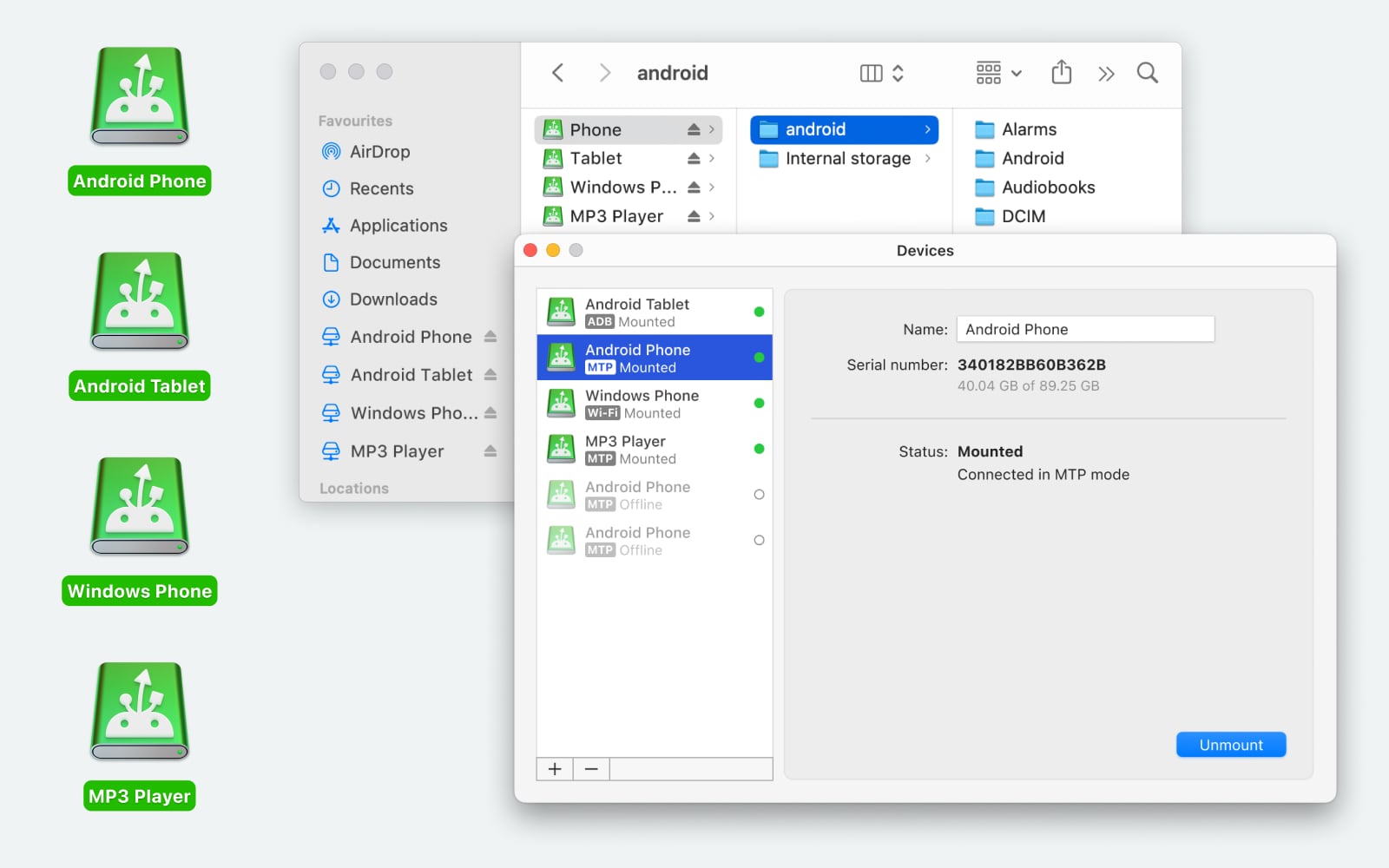
MacDroid is a macOS-focused Android file transfer tool. Unlike Android File Transfer, it is designed specifically for macOS and Android working together.
One key difference is that it can mount your Android device like a regular drive in Finder. This means you manage files directly in standard Mac windows instead of inside a separate transfer interface. It also supports both MTP and ADB transfer modes, along with an optional Wi-Fi connection mode.
There is a free version that can be used without time limits. The PRO version (about $19.99 per year) adds features such as two-way transfers and the ability to edit Android files directly from your Mac. For users who want deeper integration with macOS, this may be worth considering.
HandShaker
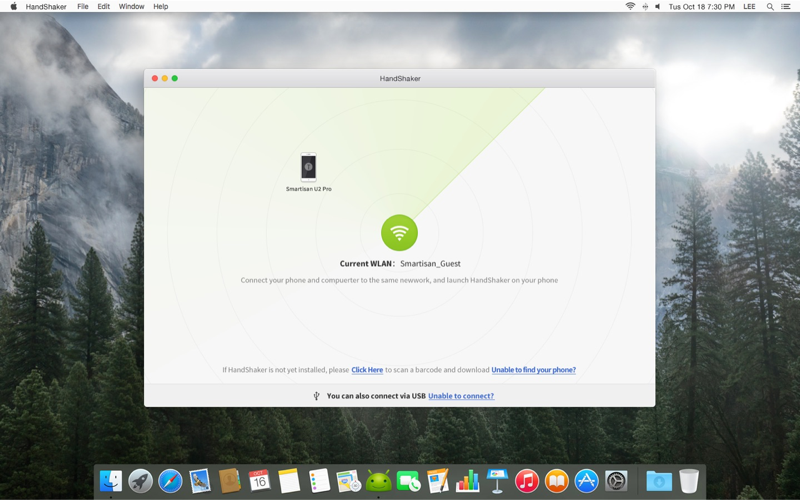
HandShaker is another free alternative. It supports viewing and managing internal storage and SD cards, and it works on both macOS and Windows.
On macOS, however, performance can be inconsistent. Some users report slow transfer speeds or occasional freezes that require force-quitting the app. Because of this, it’s generally better suited for smaller file transfers, like moving documents or a few photos, rather than handling large media libraries.
Tips for Smoother Use
A couple of practical tips often mentioned by users:
-
Enabling USB Debugging on Android can sometimes help with connection issues.
-
Avoid using special characters in file names, as they may cause transfer errors.
Overall
OpenMTP is a practical, free option for transferring files between Android and macOS. Its interface is easy to understand, and it handles everyday file transfers well for most users. However, compatibility issues with certain devices or MTP players can occur. If that becomes a problem, alternatives like MacDroid or HandShaker may be worth exploring depending on your needs.
81 Likes
Short answer for your case: OpenMTP is worth trying, but I would not call it “the best” or the most reliable for everyone.
Here is how I would look at it, based on what you wrote and what @mikeappsreviewer already shared.
- Your problem right now
Android File Transfer crashing or not seeing the phone usually points to one of these:
- Flaky MTP on the phone firmware
- Bad or charge‑only USB cable
- macOS + AFT being old and unmaintained
If AFT is failing often, you are the exact user OpenMTP targets.
- Where OpenMTP fits
OpenMTP is:
- Free and open source
- Simple two‑pane interface
- Good with big one‑off transfers like photo dumps or video copies
I agree with @mikeappsreviewer that for many phones you plug in, pick “File transfer / MTP” on Android, and it works fine.
I disagree a bit on “try a bunch of tweaks before you move on”. If OpenMTP does not see your phone after:
- Trying one known good data cable
- Switching ports on the Mac
- Setting USB mode to File transfer
I would not burn more than 10–15 minutes on it. Its weak point is device quirks, and you cannot fix those from your side.
- When MacDroid is the better pick
If your goal is “most reliable” rather than “free”, MacDroid tends to be the safer bet, especially for daily use.
Why:
- It mounts your Android in Finder like a normal drive
- It has MTP mode and ADB mode
- ADB mode ignores some of the MTP weirdness that breaks both AFT and OpenMTP
For someone transferring files often, MacDroid gives:
- Less fiddling with separate app windows
- More stable behavior with Samsung, Xiaomi, and other vendor skins
- Easier workflow for dragging stuff in Finder
You lose the “free forever” part, but you gain time and fewer random failures.
- Other options without repeating the same stuff
If you want to avoid cables completely:
- Simple SMB or FTP app on Android
- Example: run an FTP server app on the phone
- Connect from Finder with “Connect to Server”
- Works over Wi‑Fi, fine for photos and documents
- Not great for huge video libraries
If you use Google Photos or Drive heavily:
- Auto upload photos from Android
- Then pull them on the Mac via browser or desktop sync app
- Slower and less direct, but almost no debugging
- A practical plan for you
Given your starting point:
Step 1
Try OpenMTP because it is free and quick to test.
- Plug phone
- Switch to File transfer
- See if it mounts and stays stable with a few GB of files
If it works cleanly for a few transfers, keep it. No need to change.
Step 2
If OpenMTP shows any of these:
- Device not detected at all
- Folder tree half empty or not listing all storage
- Random disconnects mid‑transfer
Stop fighting it. At that point MacDroid is the sensible next step.
Step 3
If you only move small things sometimes and hate subscriptions:
- Try a Wi‑Fi based solution like an FTP server app on Android
- Use that for the quick 3–10 file jobs
So, is OpenMTP “the best” option?
It is a strong free option and much better than Android File Transfer for a lot of people.
For “most reliable on mixed Android devices and macOS”, I would put MacDroid above it, especially because of the Finder integration and ADB mode.
Short answer: OpenMTP is “better than Android File Transfer” for a lot of people, but “the best and most reliable” is overselling it.
I’ll try not to repeat what @mikeappsreviewer and @techchizkid already laid out, just add a different angle.
Where I disagree a bit with both of them: I don’t actually see OpenMTP as something you “settle on” long term if reliability is your top priority. It’s more of a stop‑gap:
- It’s great when it works: plug in, pick File transfer, drag files, done.
- But its dependency on MTP means you’re still at the mercy of:
- Vendor quirks (Samsung, Xiaomi, etc.)
- Random macOS USB weirdness
- Firmware updates that suddenly break what used to work fine
So if Android File Transfer is already crashing and not seeing your phone, there’s a non‑trivial chance OpenMTP will hit the same underlying MTP nonsense. Sometimes it magically fixes everything, sometimes it’s the same circus with a nicer UI.
Where I’ve landed:
-
If you only do transfers occasionally (photo dumps every few weeks, a couple videos), then yes, OpenMTP is worth trying first.
- Free
- Simple
- If it behaves on your specific phone + macOS combo, you’re done.
-
If you care about reliability more than “free”:
This is where MacDroid is actually the more serious option. Not saying it’s perfect, but:- Finder integration matters a lot in daily use
- ADB mode gives you a totally different path when MTP is flaky
- It feels less like a hacky bridge and more like “this is just another drive on my Mac”
Where I’m a bit harsher than @mikeappsreviewer: I would not spend ages debugging OpenMTP. If it:
- Does not see your device at all, or
- Randomly drops it mid‑transfer more than once,
I’d move on instead of swapping cables and rebooting 10 times. At that point you’re burning time to keep a free tool alive, when something like MacDroid sidesteps part of the problem.
Also, one thing I don’t see mentioned enough: if you often move lots of small files (music libraries, comic folders, etc.) MTP in general is kind of trash performance‑wise. OpenMTP won’t fix that. MacDroid in ADB mode tends to handle that pattern a bit more gracefully in my experience.
So to answer your “before I switch, is it really the best option?”:
- It’s a solid, free upgrade from Android File Transfer.
- It is not universally the “most reliable” solution.
- For “set it and forget it” reliability and smoother workflow, MacDroid is more what you’re looking for, especially if this is something you do often and you’re ok with paying for stability.
If you want a decision tree:
- Install OpenMTP, try a couple of real‑world transfers (several GB, nested folders).
- If it works cleanly a few times, keep it and move on with life.
- If it gives you even a hint of weirdness, don’t babysit it. Uninstall and go straight to MacDroid.
And yeah, Android File Transfer at this point is basically abandonware, so you’re absolutely right to get off that train.
Short version: OpenMTP is a clear upgrade from Android File Transfer, but if you want “least drama over time,” it is not the endgame.
Where I diverge a bit from @techchizkid, @shizuka and @mikeappsreviewer:
They are right that OpenMTP is the obvious free test. I’d push your thinking a bit more toward “what pattern of use do you actually have?”
1. OpenMTP vs your actual usage
-
If you plug in once every few weeks for a photo dump:
- OpenMTP is usually good enough.
- Occasional hiccup = mild annoyance, not a big deal.
-
If you are doing:
- Regular camera offloads
- Moving work files daily
- Syncing music/comics/books
Then MTP flakiness itself becomes the main problem, not the app. OpenMTP cannot fix that.
I slightly disagree with the idea that you should brutally stop at 10–15 minutes of testing OpenMTP. I’d give it one extra round of testing on a second Mac user account or after a reboot. Sometimes macOS USB sessions get stuck in a bad state and make any MTP client look worse than it is. But past that, yes, stop wasting time.
2. Where MacDroid actually earns its keep
If your priority is reliability and a “feels native on Mac” flow, MacDroid is the one worth planning around, not OpenMTP.
Pros of MacDroid:
-
Finder integration
Your phone shows like a mounted volume. No extra “special file manager” muscle memory. That alone reduces mistakes when dragging large folders. -
Two connection modes
- MTP mode for the normal case
- ADB mode when the phone’s MTP stack is a disaster
This second path is underrated and often skipped in discussions.
-
Better for ongoing use
For frequent transfers, you spend less time babysitting windows, checking if a pane is still connected, or wondering why a folder suddenly vanished. -
Works better with lots of small files
It still cannot perform miracles, but ADB mode tends to handle “thousands of tiny files” less painfully than pure MTP tools like OpenMTP.
Cons of MacDroid:
-
Paid
Subscription is the biggest turn off. If your use is very occasional, the cost-per-use feels high. -
Slight learning curve for ADB mode
You need to enable USB debugging. Not difficult, but a bit more technical than OpenMTP’s plug-and-go expectation. -
Not magic
It cannot fix a physically bad cable, a failing USB-C port, or a phone that randomly disconnects at the hardware level. Those problems follow you into any app.
For your situation, if Android File Transfer is already falling over, I’d treat MacDroid as the “serious” option rather than a distant backup.
3. How I would sequence things without repeating all the previous step lists
-
Try OpenMTP for one real job:
Move a few gigabytes, including some nested folders. If it behaves twice in a row, you can live there for light use. -
If any of this shows up:
- Incomplete folder listings
- Device disappears mid-copy
- Very inconsistent behavior between two similar sessions
At that point, I would not reinstall it three times or rotate through endless cables. Install MacDroid and test the same transfer, first in MTP mode, then in ADB mode if needed.
4. Last nuance the others did not really stress
If your long-term plan is to stay on Android and macOS for years, your real question is not “Is OpenMTP the best?” but:
“Do I want my file transfer story to depend on whether MTP feels like cooperating this month?”
If the answer is no, then OpenMTP is a nice free upgrade from Android File Transfer, but MacDroid is the tool you build your routine around.
OpenMTP is worth testing for free, but it is not the most reliable choice across every Android phone. Use it for occasional large transfers. Choose MacDroid if you move files often and want Finder access.
For photos, try LocalSend instead. Install it on your Mac and Android, connect both to the same Wi-Fi, select photos, then send them directly. No cable, cloud upload, account, or USB debugging. A 1 GB batch usually transfers within minutes on decent Wi-Fi. Setup takes about 2 minuites and avoids most MTP issues.
If this really is just photos and nothing else, most of the thread is aimed at a heavier user than you. The OpenMTP vs MacDroid debate matters a lot when you’re moving mixed folders, work files, music libraries, that kind of thing. For a plain photo grab it’s a lot of tooling for a small job.
Here’s the part nobody flagged clearly: your phone brand decides how easy this is before any app enters the picture. If you’re on a Pixel or most stock-ish Android, MTP over a decent cable is usually painless and OpenMTP will be fine. If you’re on Samsung or Xiaomi with their skins, that’s exactly where MTP gets moody, and that’s the situation where the ADB angle @techchizkid and @reveurdenuit kept pointing at actually pays off. So the honest answer to ‘is OpenMTP the best’ is ‘depends what’s on the other end of the cable,’ which is annoying but true.
I mostly agree with @sir_gadget on LocalSend for photos. That’s the one I’d try first in your case. No cable, no debugging, no file manager to learn. You pick the photos on the phone and they land on the Mac over Wi-Fi. The only caveat worth knowing is it can recompress or rename things depending on how you send, so if you care about keeping the original files exactly as-is, double check the received files once before you delete anything off the phone.
On MacDroid, it earned its spot in this thread and I wouldn’t dismiss it, but for someone who said ‘I don’t want to download something just to move photos,’ pointing them at a paid tool with an ADB learning curve feels like the wrong scale of solution. It’s the right call if you end up doing this weekly. For an occasional dump it’s more than you need.
So a shorter version of my take:
- Photos only, occasional: LocalSend over Wi-Fi, done.
- Photos plus other files now and then, Pixel-ish phone: OpenMTP is fine, don’t overthink it.
- You do this often and your phone’s MTP is flaky: that’s the actual MacDroid case, ADB mode and all.
And skip Android File Transfer entirely. Everyone above is right that it’s dead weight at this point.