I’ve been using CCleaner-style apps to clear storage and keep my iPad running smoothly, but most of the ones I find now push subscriptions or locked features. I came across Clever Cleaner and I’m trying to figure out if it’s a solid CCleaner alternative for iPad without a monthly fee. If anyone has tried it, I’d really appreciate honest feedback on cleanup tools, storage management, and whether it actually works well.
If you’re trying to find a CCleaner-type app for iPad, I ran into the same wall. Two things matter right away.
CCleaner does not have a real iPad app. The App Store route gives you the iPhone version stretched onto the tablet, and it feels off fast. Also, iPadOS does not let third-party apps dig into system junk, Safari cache, registry-type stuff, or OS cleanup the way CCleaner does on Windows. Apple keeps all of that sealed up. On iPad, the mess you’re able to clean is mostly photos, videos, screenshots, and other media. For most people, that’s where the storage went anyway.
What people seem to use instead
After reading a pile of threads and trying a few myself, the one name I kept seeing was Clever Cleaner.
What stood out for me was pretty simple.
It has a proper iPad version.
It’s free in the normal meaning of free.
No ads.
No subscription screen shoved in your face.
No “scan is free, deleting costs money” trick.
A lot of cleaner apps do the same annoying thing. You install them, wait through the scan, see the clutter, tap delete, then hit a paywall. I’ve done that dance too many times. This one didn’t pull that.
Duplicate and similar photo cleanup
This part is where it felt better than CCleaner to me.
The Similars section goes through your photo library and catches more than exact duplicates. It also pulls together near-matches, stuff like:
ten burst shots of the same person,
four copies of the same pet photo with tiny angle changes,
three low-light attempts and one sharp one,
repeat screenshots you forgot you took.
Then it groups them and marks a Best Shot. I still checked the groups, because I don’t trust any app blind, but the picks were decent more often than I expected. Good enough that cleanup stopped feeling like a chore.
CCleaner, from what I’ve seen, gets looser with “similar” matches. I saw unrelated images grouped together before, which ruins the point because then you’re back to reviewing every item one by one. On a big iPad library, that gets old fast.
Why it works well on iPad
The larger screen helps, and the app seems built for it instead of patched onto it.
There’s a Heavies section which sorts your media by size, biggest first. I liked this more than I thought I would. It makes the problem obvious. One long screen recording, one 4K clip, two downloaded videos, and there goes a few gigabytes. You see the exact sizes, so there’s no guesswork.
The Screenshots section is also practical. It lists the file size before you remove anything. If your iPad is full of old receipts, app bugs, random maps, shipping confirmations, and junk from two years ago, this clears it out fast.
Privacy was another point I checked. The processing stays on-device. Nothing in my library got shipped off to some outside server. For a tablet with personal photos, work files, scans, or kid stuff on it, I care about taht more than most app listings admit.
About the free part
Yeah, from what I saw, it’s free for real.
No ads in the app.
No blocked delete button.
No subscription nag after the scan.
No fake free label.
That alone puts it ahead of a lot of the category.
What it won’t do
This is the part people miss when they search for “CCleaner for iPad.”
No app on iPad is going to clean the system the way a Windows tool does. It won’t clear deep OS junk. It won’t touch protected system areas. It won’t do Safari cache cleanup from inside the app. Apple does not allow it.
So if your goal is media cleanup, this sort of app helps a lot.
If your goal is system cleanup, you still need to go into Settings > General > iPad Storage and handle the rest by hand.
What I’d use together
If you want a no-cost setup for the stuff people usually mean by “cleaning” an iPad, I’d split it up like this:
Clever Cleaner for photos, videos, screenshots, and large media files.
Easy Cleaner for duplicate contacts.
Cleanfox for old newsletter subscriptions and inbox clutter.
That combo covers most of the mess I see on iPads without paying for anything. It’s not PC-style cleaning. iPad does not work like that. But for getting storage back from the stuff eating space day to day, it does the job.
I tried Clever Cleaner on an iPad Air after hitting the same paywall junk in other cleaner apps. Short version, yes, it’s one of the better CCleaner alternatives for iPad if your goal is freeing storage without a subscription.
A couple things I’d add to what @mikeappsreviewer said. I don’t think it “keeps your iPad running smoothly” in the PC cleanup sense. iPadOS doesn’t work like Windows. So don’t expect speed gains from magic cache wiping. What it does well is storage cleanup. For most people, that’s the part thta matters.
What worked for me:
- found duplicate and near-duplicate photos fast
- made screenshot cleanup less annoying
- surfaced large videos I forgot existed
- no forced payment at delete time, wich is rare now
What didn’t wow me:
- contact cleanup is not its thing
- app offloading and system data still need Apple settings
- you still need to review photo matches, don’t mass delete blind
On my iPad, clearing old videos and similar pics freed more space than any “optimizer” app I’d tried before. So if you want a free iPad cleaner app with no subscription, Clever Cleaner is a solid pick.
If you want a closer look first, this Clever Cleaner iPad cleanup review and storage test is worth a watch.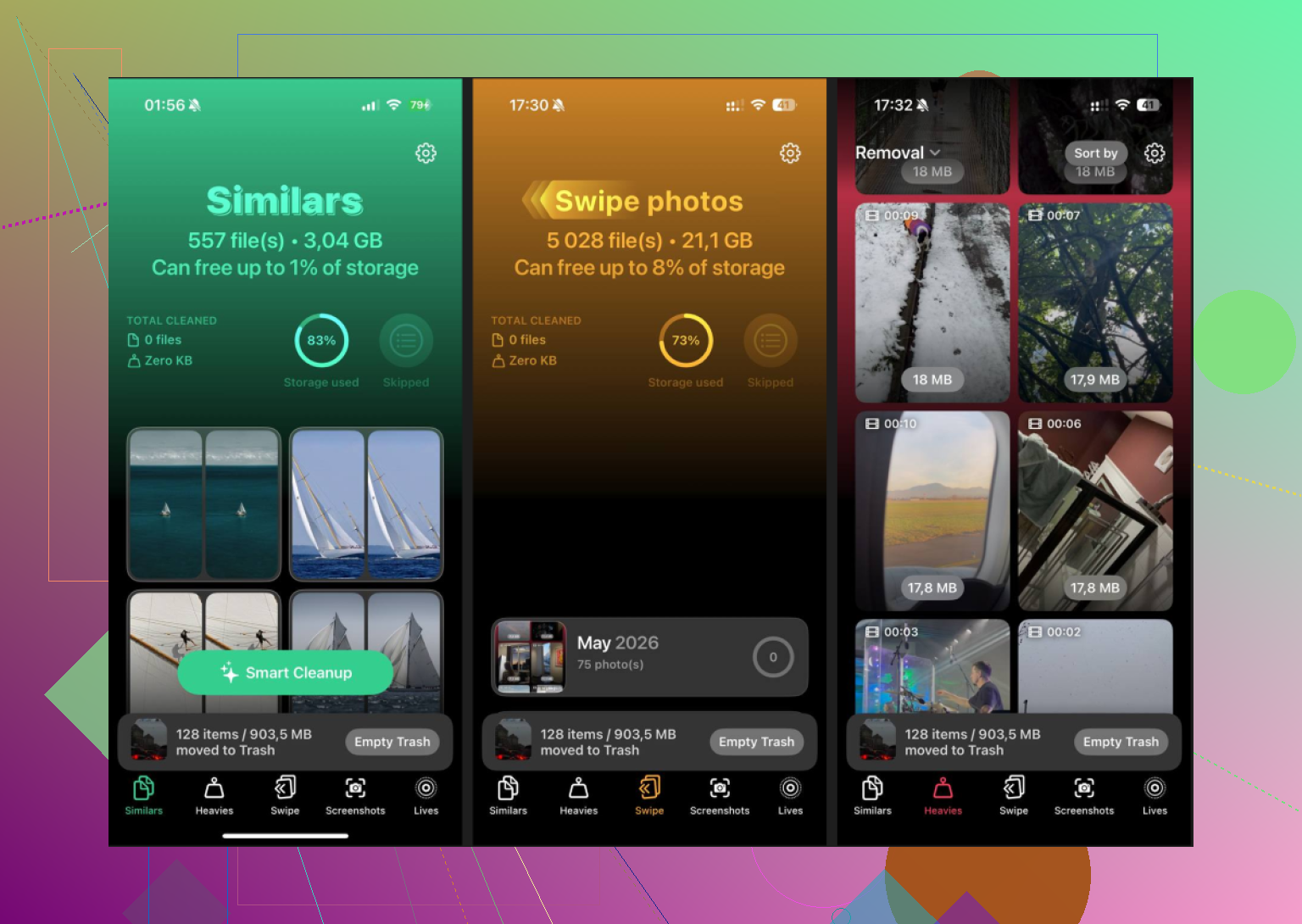
I’d say yes, with one caveat: it’s a good CCleaner alternative for iPad only if your definition of “cleaner” is reclaiming storage from your own files, not doing deep system maintenance.
That’s where I slightly part ways with @mikeappsreviewer and @sternenwanderer. I think people sometimes oversell these apps just because they’re finally free and not obnoxious. Clever Cleaner being actually usable without a subscription is great, but it’s still living inside Apple’s sandbox. So no, it’s not some miracle tune-up tool. Your iPad won’t suddenly feel like a brand new spaceship lol.
What it *is* good at:
- finding duplicate or very similar photos
- surfacing giant videos and forgotten media
- making screenshot cleanup way faster
- giving you a cleaner view of what’s hogging space
What I liked when I tested it on an older iPad:
- interface fits the iPad properly instead of feeling like a blown-up phone app
- no “scan free, pay to delete” nonsense
- cleanup felt fast enough on a big library
- didn’t bombard me with ads every 6 seconds
What I didn’t love:
- “best photo” suggestions are helpful, but I would not trust them 100 percent
- if your problem is bloated apps, Safari data, or mysterious System Data, this won’t fix that
- some people expect performance boosts, and that’s probly the wrong expectation
So, honest answer: Clever Cleaner is one of the better no-subscription iPad cleaner apps I’ve seen, mostly because it doesn’t waste your time with fake-free tricks. If your storage is packed with media clutter, it actually works well. If you want real OS-level cleaning, iPadOS just doesn’t allow that.
Also, if you want another outside look, this detailed Clever Cleaner review for iPhone and iPad cleanup gives a decent breakdown without too much fluff.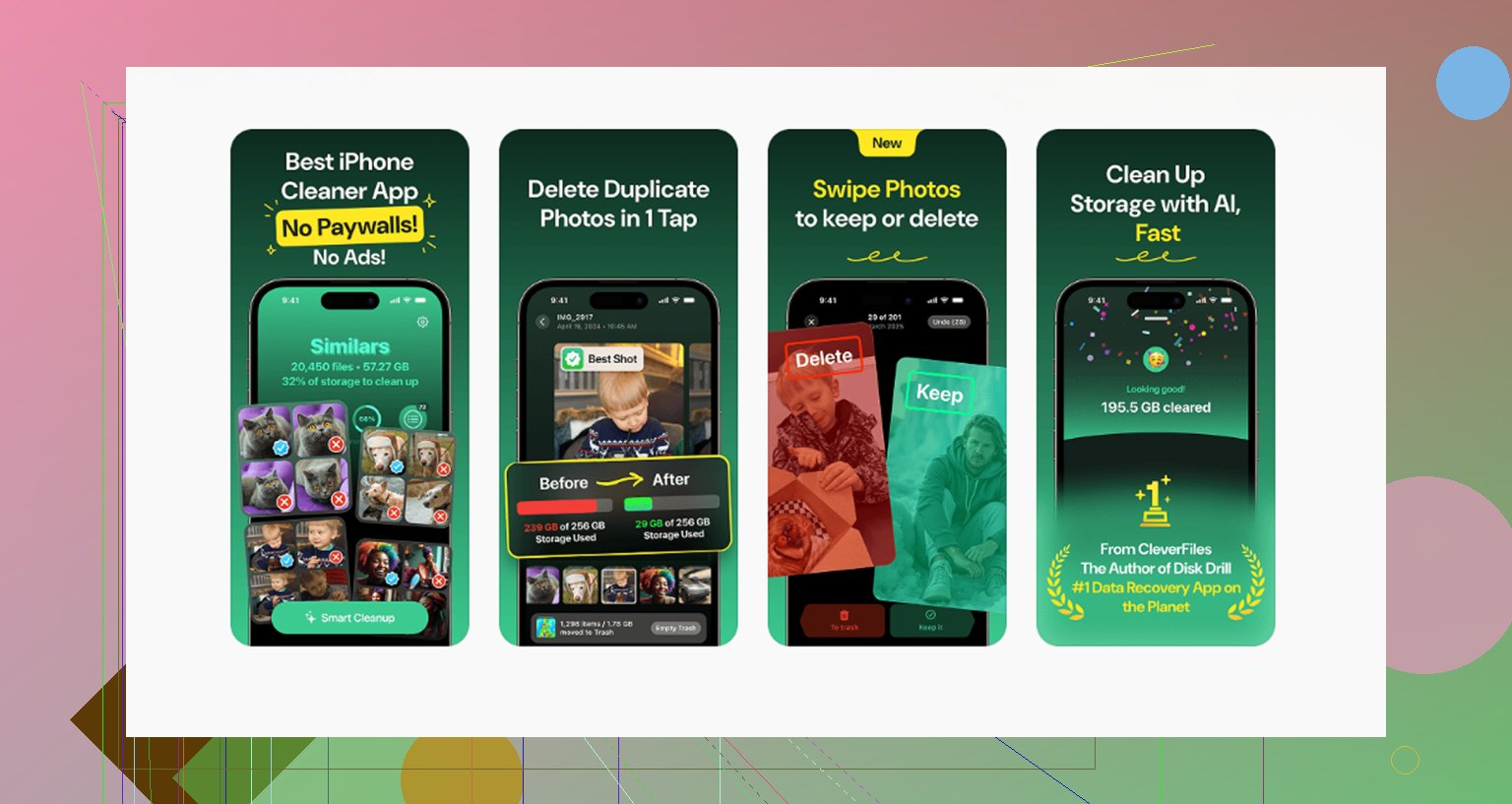
I’m a little less sold on the “CCleaner alternative” label than @sternenwanderer, @himmelsjager, and @mikeappsreviewer, but only because iPad apps simply cannot do real system-level cleaning. So if you frame Clever Cleaner as a storage cleanup app, then yeah, it’s one of the better no-subscription options.
My take after testing similar apps on iPad:
**Pros of Clever Cleaner**
- actually usable for free
- proper iPad layout
- good at spotting duplicate and near-duplicate photos
- useful for clearing screenshots and large videos
- no obvious paywall ambush after scanning
- less annoying than a lot of App Store cleaners
**Cons**
- won’t clear Safari cache or “System Data”
- won’t fix bloated app storage on its own
- “best shot” suggestions still need human review
- not a performance booster in the old CCleaner-for-PC sense
Where I disagree a bit with the hype: people sometimes expect these apps to “speed up” iPadOS. That’s mostly wishful thinking. The real win is reclaiming space from your own media library. If your storage problem is photos, recordings, downloads, and screenshots, Clever Cleaner helps. If your problem is mysterious iPadOS storage bloat, Apple Settings still does most of the heavy lifting.
So, solid alternative? Yes.
Direct CCleaner replacement? Not really.
Best use case? Photo and video cleanup without paying a subscription.