I accidentally formatted my SD card that had important photos, videos, and documents on it, and now everything is gone. I’m trying to figure out if SD card data recovery is possible after a format and what steps I should take right away to avoid losing the files for good. Any help with the best recovery options would really mean a lot.
I had this happen once with an SD card after a shoot, and yeah, the stomach-drop feeling is real. I formatted the whole card when I meant to remove one junk clip. It looked ruined. It wasn’t.
Most SD cards in cameras, drones, phones, and PCs get a quick format. What I saw after digging into it is simple. The files are often still sitting on the card. The device removes the map to them and marks the space as free. Your photos and videos stay there until new data lands on top of them.
First thing, stop using the card now.
Do not shoot more photos.
Do not record more video.
Take the card out of the device.
If the card has a lock switch, slide it to locked.
This part matters most. New writes are what kill recovery.
You’ll want a computer and a recovery app. Skip CHKDSK and random Command Prompt fixes. I tried those years ago on a different card and got nowhere. Those tools deal with file system issues. A formatted card is a different mess.
What worked best for me was Disk Drill. I had better results with video files there, mainly footage from action cams and drones. A lot of free tools pulled clips back in pieces, or gave me files which looked fine but would not open. Disk Drill handled that better, mostly because of its Advanced Camera Recovery mode. It also lets you preview files before saving them, which saved me time.
If you want the free route, PhotoRec is worth a look. I used it once on an old microSD. It found a lot, but the process felt rough. Text-heavy interface. File names gone. Folder structure gone too. You end up sorting a pile of recovered files by hand, which gets old fast.
What I’d do next:
- Put the SD card in a card reader and connect it straight to your Mac or Windows PC.
- Install the recovery software on your computer drive, never on the SD card.
- Scan the formatted card.
- If the missing files are videos, use Advanced Camera Recovery if the app offers it.
- Preview what turns up and make sure files open.
- Save recovered files to a different drive.
If you haven’t recorded over the card, your odds are still decent. Keep the card untouched, run one careful scan, and check the previews before restoring evrything.
13 Likes
You still have a shot, if the format was quick and you have not written new data to the card. Full format is worse. TRIM support on some newer devices is worse too. If the card came from an Android phone or a Switch, recovery odds drop fast.
I agree with @mikeappsreviewer on one part, stop using the card. I disagree on doing only one scan. If the first tool misses file signatures, a second scanner sometimes finds more, esp for docs and odd video formats.
What helps:
1. Make a byte-for-byte image of the SD card first. Use USB Image Tool, Win32 Disk Imager, or dd on Mac/Linux.
2. Recover from the image, not the card. This avoids extra wear and read errors.
3. Check SMART is not an option on most SD cards, so watch for slow reads or disconnects. Those hint at failing flash.
4. If the files matter a lot, skip DIY and send it to a lab before trying ten apps.
For software, Disk Drill is solid and easy to sort through. R-Studio and UFS Explorer tend to do better with damaged file systems and mixed partitions, though they cost more and feel less friendly. PhotoRec is good for raw carving, but filenames are toast.
If you want a step-by-step video, this formatted SD card recovery guide for photos, videos, and documents is worth a look.
Short version, yes, recovery is often possible after format. Not always. Your next write is the enemy, so dont put the card back in the camera.
Yes, sometimes. Everything? That’s the part people hate hearing: maybe not.
I slightly disagree with @mikeappsreviewer on the “one careful scan” idea. If the files are important, I’d actually do **one recovery pass per method**, not per card. Meaning: protect the card first, then test recovery from an image copy so you can try more than one tool without poking the original over and over. @sonhadordobosque touched on that, and I think that’s the smarter move if the data really matters.
A few extra things people forget:
- **Check if the card was encrypted** before the format. If it came from some Android setups or app-specific storage, recovered files may come back unusable without the original device context.
- **Full format vs quick format matters a lot.** Quick format often leaves recoverable data. Full format, not so much.
- **Documents are trickier than photos sometimes.** JPEGs and MP4s leave recognizable signatures. Random office files can be more hit-or-miss if the file system info is gone.
- **Do not trust file count alone.** A tool saying “found 12,000 files” means nothing if half are corrupted thumbs, fragments, or cache junk.
What I’d do:
1. Stop using the SD card, obvously.
2. Make an image of it first.
3. Scan the image with something user-friendly like **Disk Drill**.
4. If results are weak, try a second opinion with a more forensic-style tool.
5. Recover to another drive, then actually open the files and test the videos all the way through.
If this was a camera SD card and you formatted it in-camera, your chances are usually better than people think. If it was a phone/microSD with newer flash behavior, chances can drop fast.
Also, this thread may help if you want more real-world cases: formatted SD card recovery discussion for photos and videos
Short version: **SD card data recovery after format is often possible, but not guaranteed**. If nothing has overwritten it yet, you still have a legit shot.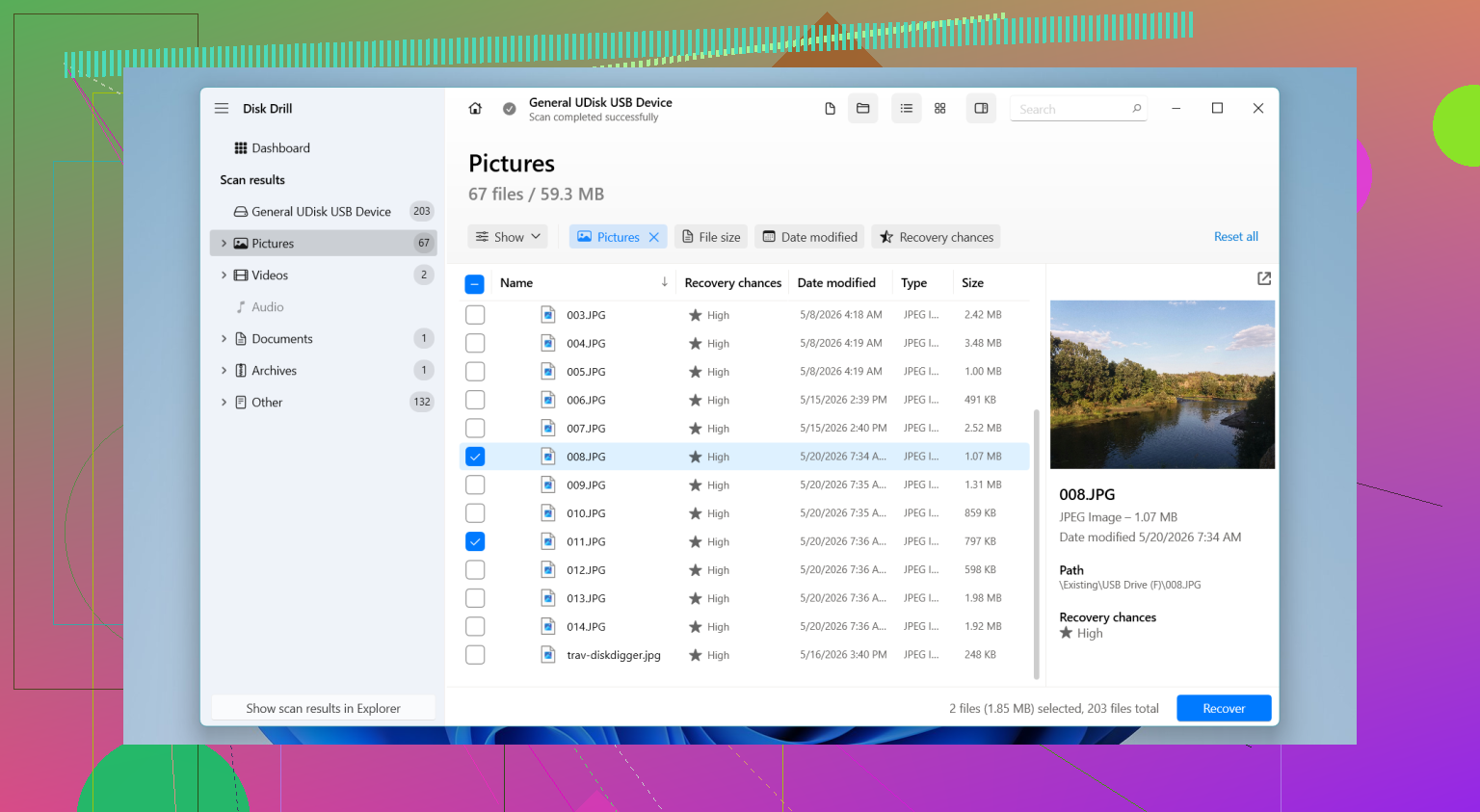
Not to be the contrarian, but I’m less optimistic about the “get everything back” part than @sonhadordobosque, @yozora, and @mikeappsreviewer. Recovery after a format is often possible, yes. Total recovery with original names, folders, intact videos, and every document? That’s where reality usually gets messy.
A couple things nobody stressed enough:
- Capacity matters. Big SD cards used near full tend to fragment video more.
- File type matters. RAW photos and JPGs usually recover better than DOCX, PSD, or database files.
- Device matters. Some cameras do a very light format. Some phones are far less forgiving.
- Cheap or fake SD cards muddy the whole situation because some “missing” data was never written correctly in the first place.
One thing I’d do before chasing software is check whether the card now shows the expected full capacity and correct file system. If it suddenly reports weird size, asks to be initialized again, or disconnects mid-read, you may be dealing with hardware trouble, not just a format event.
On tools, Disk Drill is a reasonable first stop because the interface is easy and previews are useful.
Pros:
- simple to use
- good file preview
- solid for common photo and video recovery
- less intimidating than forensic tools
Cons:
- can be pricey depending on what you need
- deep scans can return lots of junk
- not always the best with badly damaged file systems
- recovered names/folders are not guaranteed after format
If Disk Drill comes up short, that does not always mean the files are gone. It can also mean the card’s structure is too damaged or the files were fragmented in a way that signature-based recovery struggles with.
So yes, SD card data recovery after format is possible. “Everything back” is possible too, just not something I’d promise. The less you touched the card after formatting, the better your odds.