I’m trying to merge duplicate photos on my iPhone, but the Photos app only finds a small number of duplicates even though I can clearly see many more in my library. I’ve already checked the Duplicates album, but most matching pictures are still missing. I need help figuring out why iPhone duplicate photo detection is not working and how to merge all duplicate photos correctly.
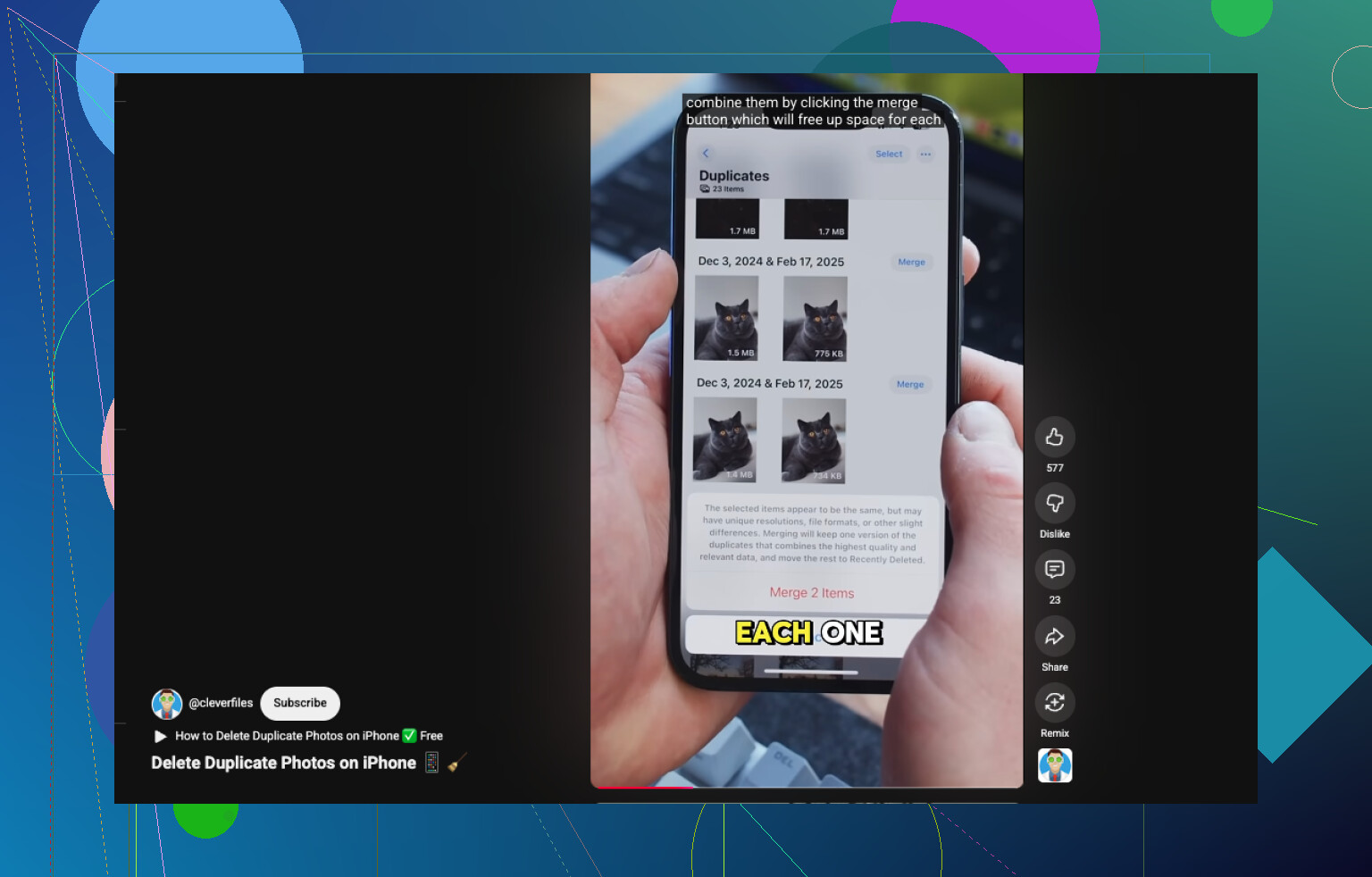
If you mean exact copies, your iPhone already has a built-in way to handle it in Photos.
Open Photos.
Scroll to Utilities.
Tap Duplicates.
Hit Select, then Select All, or pick groups one by one.
Tap Merge and confirm.
One small gotcha. The Duplicates album does not always show up right away. I saw this after moving a bunch of photos over and once after restoring from backup. iOS needed a while to scan the library before anything appeared there.
Where Apple falls short, at least for me, is with near-matches. My library sits around 5,000 photos, and the mess was not exact copies. It was stuff like four shots of the same receipt, a burst of dog pics where one ear moved, or three sunset photos taken two seconds apart. The built-in Photos tool ignored most of that.
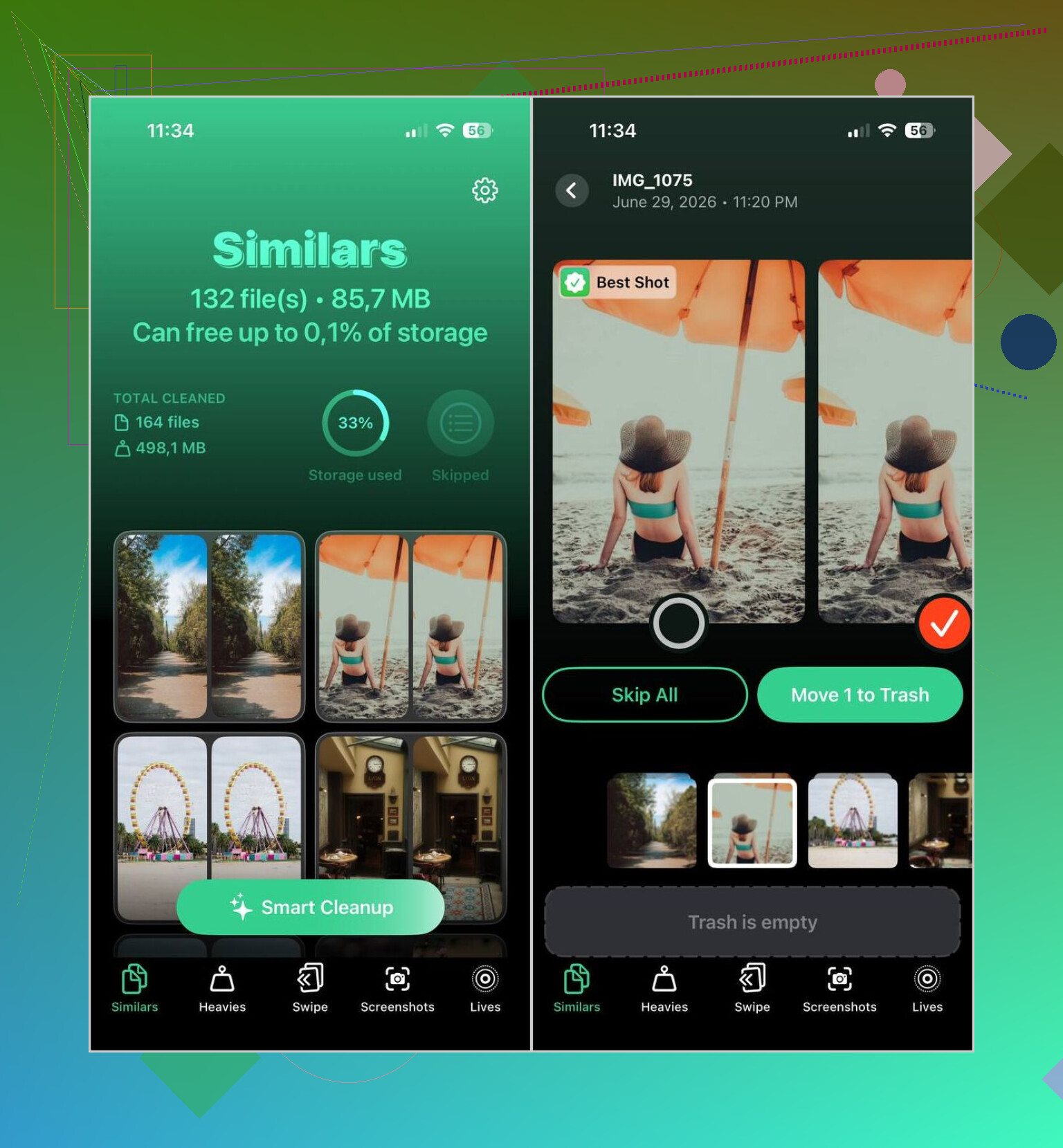
I ended up using Clever Cleaner for those cases. What stood out to me was it grouped both duplicates and similar photos, which got me a lot more free space than the Duplicates album ever did.
The steps were simple on my end.
Install Clever Cleaner from the App Store.
Give it access to your photo library and let it scan.
Open the Similars section.
Use Smart Cleanup if you want it to pick the best image for each group, or sort them yourself.
Review the picks, put back anything you want to keep, then confirm deletion.
Afterward, clear Recently Deleted if you want the storage back now instead of later.
I still check its choices before removing anything. Even so, it has been right most of the time for me. It usually kept the sharpest shot or the one where faces looked best.
I stuck with it for the extra cleanup tools too, since duplicates were only part of the problem.
Heavies lists videos from biggest to smallest, which made it easy for me to spot what was eating storage.
Video Compression shrank a few large clips when I did not want to delete them. I got back a few GB doing this.
Screenshots let me wipe old screen grabs fast.
Lives turned Live Photos into standard photos, which trimmed storage a bit.
Swipe made it easier to go through older months without digging through the whole library.
So, if your goal is merging a few exact duplicates, Apple Photos does the job fine. If your library is full of near-identical junk photos, the built-in option misses a lot. In my case, Clever Cleaner did a better cleanup and freed more space.
10 Likes
Photos only merges exact duplicates, and even then it skips stuff until indexing finishes. So if you see 10 copies and iPhone finds 2, that’s normal, annoyngly.
I’d do 3 things before trusting the Photos app:
- Keep your phone on power overnight.
- Turn off Low Power Mode.
- Make sure iCloud Photos is fully synced.
A lot of “missing duplicates” are not true duplicates. They differ by edit data, resolution, Live Photo info, file type, or metadata timestamp. Apple treats those as separate items.
I slightly disagree with @mikeappsreviewer on one point. Third-party cleaners are useful, but “merge” is not what most of them do. They identify similar shots, then delete the extras. Important difference.
If your goal is broader cleanup, Clever Cleaner is a solid option because it catches similar photos the iPhone Photos app ignores. Review every group manualy though. Similar-photo detection is hit or miss with receipts, pets, and screenshots.
For a quick visual explainer, this short guide on finding duplicate and similar photos on iPhone helps: how to remove duplicate photos on iPhone fast
If you want better Photos results first, take a test set of 5 obvious dupes, duplicate them in Files or save them again, then wait. If those appear in Duplicates but your old ones don’t, the old ones are near-matches, not exact copies. That’s usally the reason.
What you’re seeing is pretty normal, and I’d push back a little on the idea that Photos is “broken.” It’s just very picky. The iPhone Duplicates feature mainly catches true 1:1 copies. If two pics look identical to your eyes but one has different edit history, was saved from WhatsApp, got re-downloaded, lost Live Photo data, or changed format from HEIC to JPG, Photos may treat them as different items.
That’s why @mikeappsreviewer and @kakeru are both kinda right, but I think the bigger issue is Apple uses a narrow definition of duplicate. So “misses most of them” often really means “doesn’t count similars.”
A few things worth checking that usually get overlooked:
- Restart the phone after a big import
- Leave Photos open for a bit while charging on Wi-Fi
- Check if the “duplicates” are actually in Shared Library, iCloud, or synced from a computer
- Look at file info. Same image content does not always mean same photo object
Also, be careful with the word merge. Apple merges metadata and keeps the best version for exact duplicates. Third-party apps usually identify similar photos and let you delete extras. Not the same thing.
If your goal is cleanup, not strict merging, Clever Cleaner is probly the more useful route because it catches similar shots the Photos app ignores. Just review before deleting, because AI can get a little dumb with receipts, pets, and blurry concert pics.
Also this thread is useful if you want a more complete guide on iPhone photo cleanup: best ways to delete duplicate and similar photos on iPhone.
Short version: Apple Photos is fine for exact dupes, kinda weak for everything else. Annoying, yeah, but expected.