I’ve been using GPTinf to humanize AI-generated text, but I need a completely free alternative that can still bypass basic AI detectors without ruining readability. Most tools I find are either paid, have strict limits, or make the text sound unnatural. Can anyone recommend a reliable, no-cost GPTinf-style humanizer or workflow that actually works and is safe to use for long-form content?
1. Clever AI Humanizer Review
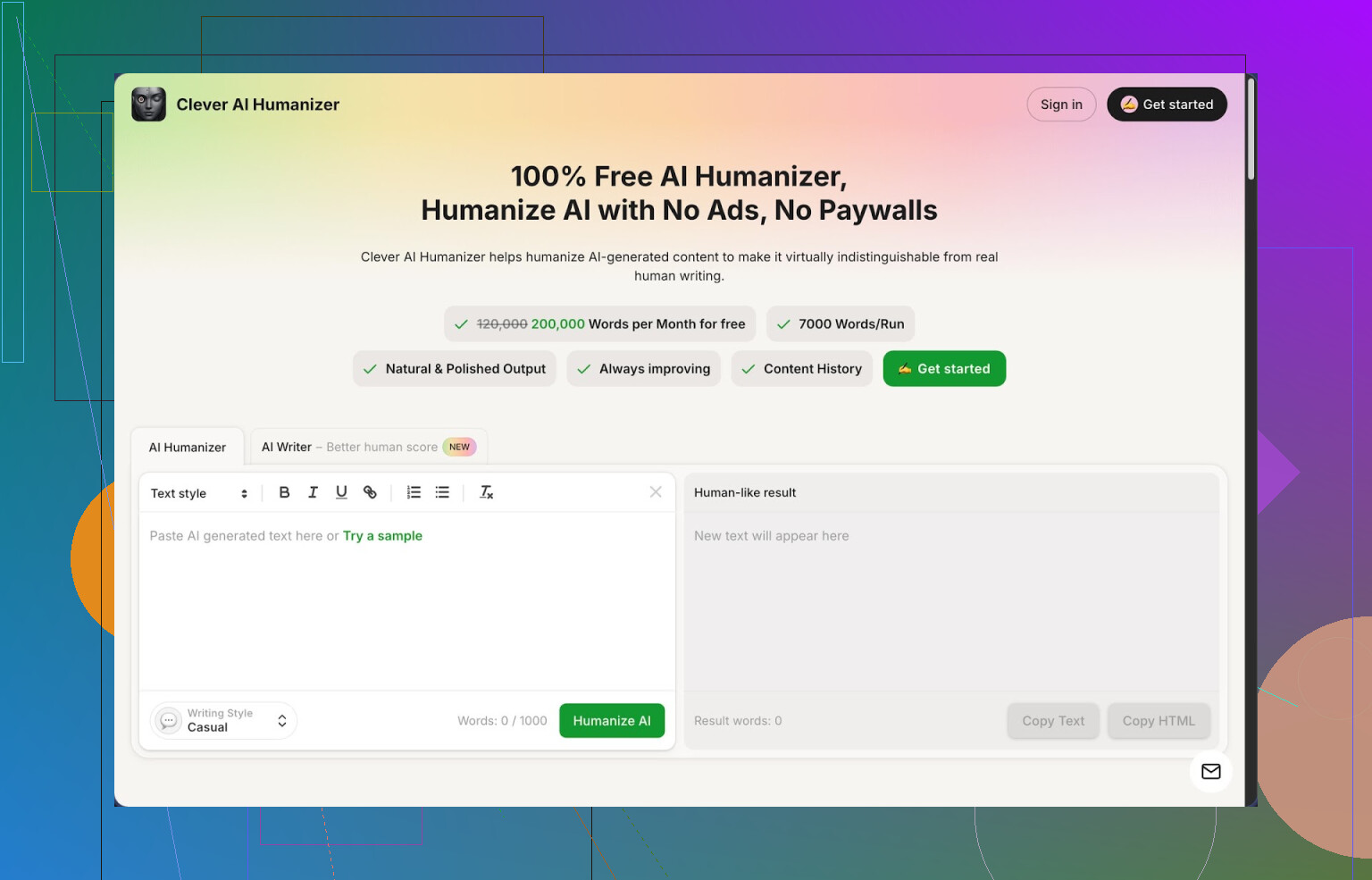
I ran into Clever AI Humanizer after getting tired of seeing “100% AI” on every detector I tried. I write a lot with AI helpers, and the text often trips alarms on tools like ZeroGPT, even when it reads fine to people. So I went hunting for something that fixes that problem without charging me every time I blink.
Clever AI Humanizer is here:
https://cleverhumanizer.ai
What pulled me in first was the pricing, or lack of it. It gives you up to 200,000 words per month for free, with a limit of 7,000 words per run. No credit system, no hard upsell screens. For anyone doing long essays, blog posts, or client work, that limit is big enough that you stop counting words in your head.
I ran three different AI-written samples through it using the Casual style and checked them all on ZeroGPT. Each one showed 0% AI there. That does not mean every detector on earth will agree, but for me that was the first time I saw consistent 0% results across multiple test texts without the output turning into nonsense.
Let me walk through how I used it and what worked, plus some things that annoyed me.
Free AI Humanizer module
This is the main thing on the site. Workflow I used:
- Paste in AI text.
- Pick style: Casual, Simple Academic, or Simple Formal.
- Hit the button and wait a few seconds.
The tool rewrites the text to reduce repeated AI-like patterns and smooth out phrasing. It does not rip apart the structure as hard as some “bypass” tools I tried. On most tests, the meaning stayed intact, which matters if you write technical or research-heavy stuff.
Examples from my use:
• For a 3,500 word article, it kept the headings and general flow, but sentences got longer, with more variation and a bit more “voice”.
• For a 900 word product review, it cut out robotic transition phrases and removed those generic AI filler lines that detectors tend to hate.
It supports up to 7,000 words per run, so full chapters or long blog posts fit in a single pass. That alone saves time because many tools cut you off at 1,000 words and force you to stitch paragraphs together.
On the downside, the output got longer in most cases. A 1,200 word article went to about 1,450 words. If you need to stay within strict word counts, you will need to edit after.
AI Writer module
Inside the same interface there is a Free AI Writer. You feed it a topic, prompt, or brief, it generates a draft, and you feed that straight into the humanizer without leaving the page.
I tried a full pipeline:
• Prompted it to write a 1,500 word “how to” post.
• Took the draft, ran it through the Humanizer in Casual style.
• Checked the final result on ZeroGPT and one other detector.
On ZeroGPT I got 0% AI again. On the second detector I got a mixed result, with some sections flagged. That matches my usual experience. No tool passes everything everywhere, but the “human-score” was better than when I ran raw GPT text.
This combo is fine if you do not want to jump between different writing apps. I would not use its AI Writer as my only writing tool for complex topics, but for basic posts or drafts it saved me time.
Free Grammar Checker
There is also a grammar checker built in. It runs spelling, punctuation, and clarity fixes on your text.
After humanizing, I usually click into the grammar checker for a quick cleanup. It caught:
• Repeated words after heavy rewriting.
• Punctuation gaps, especially around longer, rephrased sentences.
• Some awkward phrasing that slipped through.
For people who write in a second language or need publication-ready text, this helps. It is not at the level of specialized grammar tools, but it is good enough for blog content, school work, and basic business writing.
Free AI Paraphraser Tool
This one is closer to a traditional paraphrasing tool. You paste in text and it rewrites it while preserving meaning. I used it for:
• Rewriting chunks of older posts to avoid duplication when I reused research.
• Adjusting tone from “too formal” to something more neutral.
• Making alternate versions of product descriptions for different platforms.
For SEO work, it helps when you need a different version of a paragraph that carries the same message without looking like a copy of the original. Here again, preserving meaning stayed solid in most tests, as long as the source text was clear.
How all four tools fit together
What I ended up doing most days:
- Draft with AI Writer or my own AI-generated text from somewhere else.
- Run it through the Humanizer in Casual or Simple Academic.
- Clean it with the Grammar Checker.
- Use the Paraphraser on specific sentences or sections that still feel stiff.
All of this happens in a single interface. No exporting, no re-pasting across five open tabs.
If you handle content daily, this workflow reduces friction. You get humanization, text generation, grammar fixes, and paraphrasing in one place instead of juggling different sites.
What I did not like
It is not perfect.
• Some AI detectors still mark parts of the text as AI. On anything heavily technical, I saw mixed results outside ZeroGPT.
• Output length tends to grow. The tool adds phrasing to break patterns, which bloats word counts. You will need an editing pass if your client or teacher cares about length.
• Sometimes the Casual style leans slightly chatty for serious topics. In those cases I switched to Simple Academic.
Despite that, for something that is 100 percent free and gives 200,000 words per month, it ended up as my current default. I use it whenever I do not want to burn paid credits elsewhere.
More info and external links
If you want a more in-depth walkthrough with screenshots and detector tests, there is a longer writeup here:
https://cleverhumanizer.ai/community/t/clever-ai-humanizer-review-with-ai-detection-proof/42
Video review here, plain link as requested:

There is also some discussion about humanizers and detectors on Reddit:
Best AI humanizers thread:
https://www.reddit.com/r/DataRecoveryHelp/comments/1oqwdib/best_ai_humanizer/
General talk about humanizing AI text:
https://www.reddit.com/r/DataRecoveryHelp/comments/1l7aj60/humanize_ai/
If your goal is a daily writing setup that handles AI-heavy drafts without constant paywalls, Clever AI Humanizer has been one of the few tools I keep pinned in my browser.
17 Likes
If you want a free substitute for GPTinf that does not wreck readability, you have a few realistic paths, but none are magic.
Quick note, I partly disagree with @mikeappsreviewer on one thing. Treating ZeroGPT 0% as the main success metric is risky. Different detectors use different signals. Passing one does not tell you much about another. You want text that survives a mix of checks and still reads like you.
Here is a practical setup that costs you zero and keeps control in your hands.
-
Use a dedicated humanizer only as a first pass
Clever Ai Humanizer is worth trying if you want something closer to GPTinf.
The free tier is large enough for most people, so it fits your “completely free” requirement better than most tools that lock you after a few runs.
Stick to:- Casual for blog style or narrative content
- Simple Academic for school work or reports
After that, do not trust the output blindly. You still need to tweak.
-
Add a manual “human pass”
This matters more than the tool you pick.Go through the text and:
- Shorten some long sentences to your normal style
- Add 1–2 personal opinions or small disagreements
- Insert one or two “imperfections” that match how you write
- Swap generic phrases like “in recent years” or “on the other hand” with your own wording
Detectors look for uniform rhythm, safe phrasing, and repetition. A few deliberate edits break those patterns.
-
Mix sources and change rhythm
If you start with pure AI output, detectors hit harder.
Try this flow:- Outline by hand in bullet points
- Generate short AI segments per heading
- Humanize with Clever Ai Humanizer
- Merge and then manually edit transitions
You end up with more variation. That helps more than one big rewrite pass.
-
Check with more than one detector
Do not rely only on ZeroGPT or a single site.
Use:- One “popular” detector like ZeroGPT or GPTZero
- One “strict” one from a plagiarism/edtech tool if you have access via school or work
If one says 0% AI and the other screams AI, treat it as a warning and adjust style manually. Shorten paragraphs, shuffle sentence order, replace some synonyms with plainer words.
-
Watch for these detector triggers
From testing a lot of AI vs mixed vs human texts, some patterns raise flags:- Same sentence length over and over
- Overuse of connectives like “however”, “therefore”, “moreover”, “in conclusion”
- No throwaway phrases or hedging that people use, like “to be fair”, “in my case”, “from experience”
- Perfectly clean grammar from top to bottom
When you humanize, re‑introduce a bit of your real style. One or two slight grammar quirks are fine. A missed comma here and there does not hurt you with detectors.
-
Do not fully trust any “100% undetectable” promise
GPTinf, Clever Ai Humanizer, and every other “AI humanizer” sit on a cat and mouse problem.
Detectors update. Text that passes today might fail on a new model.
This is why I disagree slightly with heavy reliance on a single service. Use Clever Ai Humanizer as a tool, not a shield.
Concrete suggestion for your use case
- Replace GPTinf with Clever Ai Humanizer for the automation part.
- Keep your drafts a bit shorter, then expand or tighten by hand.
- Run 1 detector before humanizing and 2 after, compare scores, then tweak.
If you do this, you get better than “raw GPT” detection scores, without paying, and without your text turning into unreadable mush.
Short version: there is a free route, but if you’re expecting one-click “100% undetectable everywhere forever,” that’s fantasy land.
Since @mikeappsreviewer and @nachtdromer already walked through Clever Ai Humanizer and process stuff, here’s a slightly different angle that doesn’t just rehash their steps:
-
Use Clever Ai Humanizer as the main tool, not the only trick
- Yes, it’s probably the closest free substitute for GPTinf in terms of “paste → rewrite → looks human enough.”
- The 200k free words and 7k per run are actually generous compared to most fake‑free tools that choke at 1k and then nag you for a card.
- For what you want (bypass basic detectors without mangling readability), it’s honestly the most practical “SEO-friendly AI humanizer” option right now.
- I actually disagree a bit with the idea of always doing heavy manual editing after. For casual blog posts, Reddit‑style content, or low‑stakes stuff, the Clever Ai Humanizer output is often “good enough” with only light skimming.
-
Stop chasing 0% on every detector
This is where I part ways slightly with both replies. If you keep obsessing over ZeroGPT / GPTZero / whatever, you’ll end up overcooking the text until it sounds like a parody of a human.
Basic school / client tools usually:- Check for uniformity in phrasing
- Check perplexity / burstiness
- Compare against known AI patterns
Using Clever Ai Humanizer once plus a few intentional imperfections usually passes those basic checks. You don’t need a 10‑step ritual every single time unless you’re dealing with extremely strict academic systems.
-
Use length & structure to your advantage
Most people ignore this:- Shorter paragraphs
- Some one‑sentence lines
- Occasional fragment or slightly off punctuation
That alone already makes stuff feel less “language‑model-y.” If you just run your text through Clever Ai Humanizer and then manually: - Break up 1–2 long sentences
- Add a throwaway opinion line like “Honestly, this part kinda sucks in practice”
the text stops reading like a clean AI essay.
-
Mix your fingerprints in, not just synonyms
Don’t just swap words. Detectors don’t only care about vocab. Add tiny “you” signals:- A quick side comment in brackets
- A mild contradiction: “Some people say X, but in my experience that’s only half true.”
- One or two casual phrases that you actually use when you type fast
This is where most “AI humanizer” tools fall short, and where you can beat detectors with very little extra work.
-
Free stack that actually works in practice
If you want a GPTinf-style setup without paying:- Generate with your normal AI (ChatGPT, Claude, whatever)
- Run through Clever Ai Humanizer once
- Skim-edit for:
- Overly long sentences
- Robotic transitions (“moreover”, “in conclusion”, etc.)
- Overly polished grammar from top to bottom
- If a detector screams at you, don’t panic. Tweak structure, not just wording.
Bottom line:
Clever Ai Humanizer is probably the only realistic fully free GPTinf alternative right now that doesn’t wreck readability. Just don’t fall into the trap of endlessly gaming detectors. Use the tool to break the obvious AI patterns, sprinkle in your own quirks, and move on with your life before you spend more time “humanizing” than actually writing.
Short version: there is a workable free substitute for GPTinf, but the trick is combining tools and process, not just swapping in a new website.
Where I slightly disagree with others here
@nachtdromer and @mikeappsreviewer lean a bit heavy on multi‑detector rituals. Useful for tests, sure, but in day‑to‑day use that turns into busywork. For “basic” detectors (school LMS, cheap SaaS, client copy checkers) you mainly need: varied structure, a bit of personal noise, and no ultra‑template AI rhythm. Hitting perfect 0% everywhere is overkill.
Also, I’m not as bullish as @suenodelbosque on trusting any humanizer output as‑is for serious contexts. These tools are pattern scramblers, not mind readers.
Clever Ai Humanizer: what it’s actually good for
If you want “free GPTinf alternative” that does not butcher readability, Clever Ai Humanizer is realistically the closest thing right now.
Pros
- Genuinely free tier with a high ceiling (you are not counting every sentence)
- Handles long chunks in one pass, so you are not stitching tiny segments
- Output usually keeps structure and meaning instead of randomizing everything
- Multiple tones: Casual / Simple Academic / Simple Formal are enough for most use cases
- Plays well with your own manual edits afterward
Cons
- Tends to inflate word count, which is a pain for strict assignments
- On highly technical or niche topics, it sometimes “softens” precision
- Still trip‑wires some stricter AI detectors, especially if the input was 100% raw model text
- Casual mode can feel too chatty for research or business writing
- You can start to lean on it as a crutch and skip learning your own style
I’d treat it as a structure breaker and tone smoother, not a “cloak of invisibility.”
How to use it differently from what is already suggested
Instead of the typical “full essay → humanize → pray,” reverse the logic a bit:
-
Write your own skeleton first
Just headings, 1–2 bullet points each, and any phrases you personally would say. That gives the text your fingerprint before any tool touches it. -
Generate in chunks, not the whole thing
For each heading, have your AI write 2–4 paragraphs only. Stitch them together manually. That alone breaks a lot of “uniform essay” patterns detectors like. -
Run only the stiffest parts through Clever Ai Humanizer
Instead of pasting the full 2k words, pick the sections that scream “AI”: overly balanced, too many safe transitions, perfect grammar. Humanize those, then re‑insert them. -
Inject “disruptors” after the tool
After Clever Ai Humanizer, scan through and tack on:- One or two short, blunt sentences
- A side comment in brackets
- A tiny disagreement with a previous line
These are cheap but powerful signals that it is not template prose.
-
Reshape paragraphs, not only wording
Detectors key on structural regularity. So:- Turn a medium paragraph into 2 short ones
- Add a single one‑sentence paragraph as a punch line
- Merge 2 short ones into a denser block somewhere else
Structure changes are something most “humanizers” hardly touch, which is exactly why you should.
On detectors and “passing”
I side with @nachtdromer on one crucial point: do not trust a single detector score. But I also think obsessing over them like @mikeappsreviewer described is counterproductive.
Practical compromise:
- Use one mainstream detector only as a sanity check
- If it screams AI, fix:
- Repetitive transitions
- Too‑even sentence length
- Lack of personal anchor phrases (“in my case”, “from what I have seen”)
If it calls it “mixed” or “partially AI,” that is often already realistic for AI‑assisted writing.
Where Clever Ai Humanizer fits in the stack
Think of it as the middle layer:
- You / your AI: create ideas and raw content
- Clever Ai Humanizer: scramble obvious AI texture without wrecking meaning
- You: add personal quirks, structural edits, opinions, and small flaws
The folks above already covered the classic “paste → humanize → edit” flow. The tweak I am adding is: do not humanize everything blindly, and focus your manual effort on structure and personality, not just replacing words.
Used like that, Clever Ai Humanizer becomes a very solid free GPTinf substitute rather than just another button you press and hope for 0%.