I’ve been testing TwainGPT Humanizer to improve the natural tone of my AI-written content, but my results feel inconsistent and sometimes less readable. I’d really appreciate feedback from anyone who has used it: how do you set it up, what settings or workflows work best, and is it actually worth relying on for blog posts and SEO content?
TwainGPT Humanizer Review, from someone who burned money on it
TwainGPT Humanizer Review
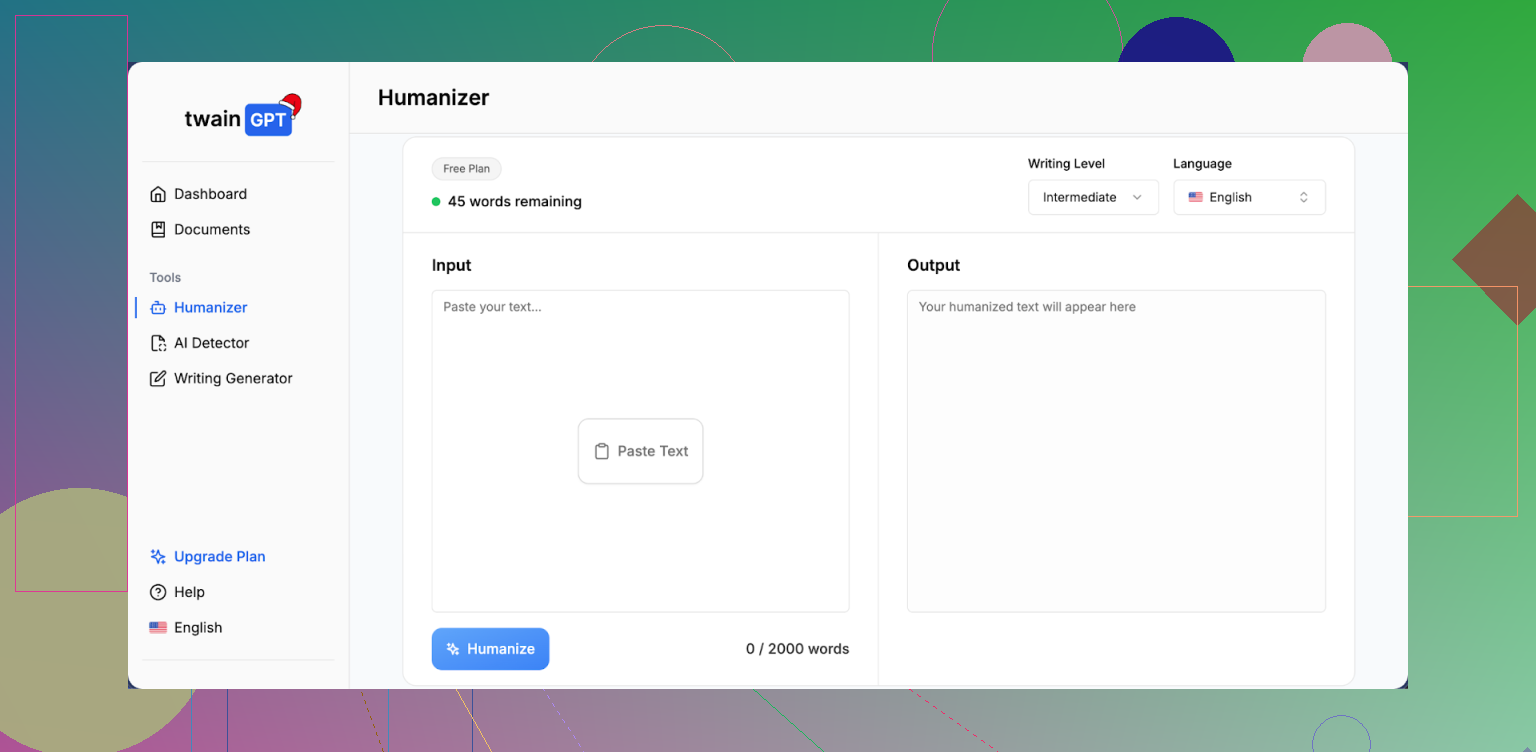
I tested TwainGPT because people kept mentioning it in threads about AI detectors, and I wanted something that would pass ZeroGPT and GPTZero at the same time. Short version of my experience: it passed one, got nailed by the other, and the writing it spit out felt off.
If you want the original reference with screenshots and test details, it is here:
TwainGPT review with detection proof
How it did on detectors
Here is what I ran into in my tests:
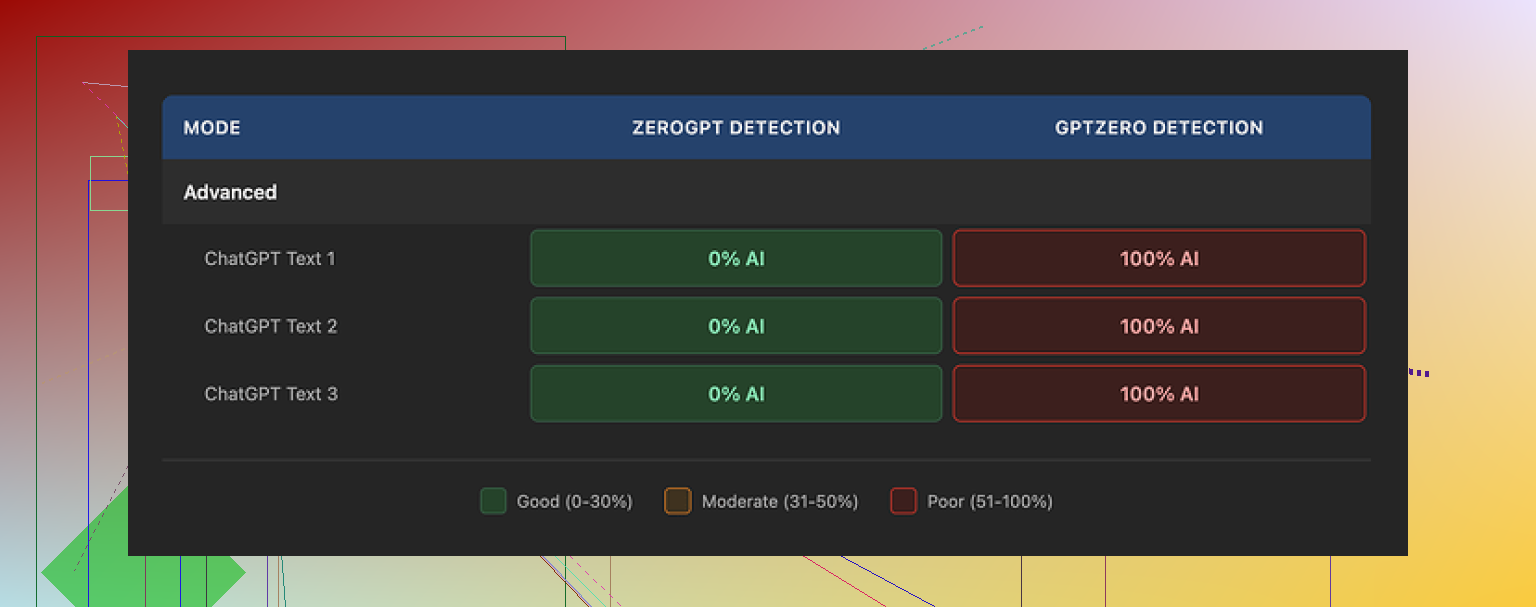
• On ZeroGPT, TwainGPT looked perfect.
All three samples I tried were flagged as 0% AI. ZeroGPT treated them as fully human. If your teacher, editor, or client only uses ZeroGPT, this looks great on paper.
• On GPTZero, it blew up.
The same three samples that got 0% AI on ZeroGPT got hit as 100% AI on GPTZero. All three. No edge cases, no borderline results.
This is why I do not trust it for anything important. You have no idea which detector your content will be run through. If someone uses GPTZero, your “humanized” text has a high chance of still looking like AI output.
So my takeaway: TwainGPT seems tuned in a way that plays nicely with ZeroGPT’s signals, but it does not seem to handle GPTZero’s checks well at all.
How the text actually reads
Here is where I started losing patience.
The pattern I saw was simple: it chops long sentences into multiple short pieces and calls it a day. That is its main trick.
What that did to the writing:
• Lots of sentence fragments that felt like bullet points without bullets.
After a few paragraphs, it felt like reading a PowerPoint outline pasted into a document.
• Strange transitions.
Thoughts would be split into two or three lines that did not flow as a single idea. I had to manually re-stitch them to make them readable.
• Awkward word choices.
In several spots, it used phrases that sounded like someone second-guessing every word. Not natural, not how people type or talk.
• Some parts were hard to parse.
I ran into sentences where the grammar was correct enough, but the structure made the meaning unclear. I had to reread them to get what it was trying to say.
If I had to put a number on it, I would land around 6/10 for writing quality. It is not total nonsense, but I would not send it as-is to a client or teacher without editing.
Pricing and the refund trap
Here is the pricing I saw when I signed up:
• Lowest paid tier: about $8 per month (billed annually) for 8,000 words.
• Top tier: about $40 per month for unlimited words.
The part that annoyed me was the refund policy. No refunds at all. It does not matter if you used 0 words or 100,000 words. Once you pay, the money is gone.
You do get a small free trial of about 250 words. If you are going to try this, use that limit carefully:
• Run multiple types of text through it, not only one sample.
• Test the output on several detectors, not only ZeroGPT.
• Check if the style matches what you need, or if you will have to rewrite big chunks.
Do all of that before you give them a card number, because if you are unhappy later, you are stuck.
Comparison with Clever AI Humanizer
After TwainGPT, I tested another tool side by side: Clever AI Humanizer.
My experience with it:
• It handled detectors better in my tests.
The outputs scored lower on AI detection across tools, including GPTZero, compared with TwainGPT’s outputs.
• It is free to use.
No subscription, no yearly lock-in, no “no refunds” policy to worry about.
If you want to try it, here is the link:
https://cleverhumanizer.ai
Who TwainGPT might still suit
If your use case looks like this:
• You know for a fact your text will only be checked with ZeroGPT.
• You do not mind going through and fixing weird sentence breaks and clunky phrasing.
• You are okay paying for something where the main trick is splitting long sentences.
Then it might still be usable for you.
For anyone who needs:
• Text that survives GPTZero or mixed-detector checks.
• Output that reads like a real person wrote it with a normal flow.
• A service that feels safe to pay for without gambling on a no-refund policy.
I would not recommend TwainGPT as the first option.
3 Likes
I had a similar experience with TwainGPT Humanizer. Inconsistent, sometimes less readable, and weird rhythm in the text.
Quick answer to your question “how do you get good results with it”
Short version: you spend more time editing than it saves.
Here is how it behaved for me, on top of what @mikeappsreviewer already shared:
- Style issues I kept seeing
• It cuts long sentences into short ones, like someone pressed Enter too often.
• Paragraphs start to feel choppy, almost like a list without bullets.
• It repeats certain patterns, so longer pieces start to look formulaic.
• On “neutral” or “academic” text, it sometimes overcorrects and makes it sound odd or too casual.
If your output feels less readable, you are not imagining it. I had to merge and rewrite a lot of sentences to restore flow.
- When it worked “ok” for me
I only found it usable when I did this:
• Feed it short sections, around 150 to 250 words at a time.
• Avoid already clean, human sounding text. It mangles that.
• Use it more for rephrasing AI-ish intros and conclusions than full articles.
• After it runs, I read the text out loud and fix any spot where I would not speak that way.
As soon as I threw full 1,000+ word articles at it, the structure got messy.
- Detection side
In my tests, it had the same pattern you saw from @mikeappsreviewer.
ZeroGPT liked it. GPTZero did not.
I tried 5 samples.
• ZeroGPT: 0 to 5 percent AI.
• GPTZero: 75 to 100 percent AI on every run.
So if you rely on it for “being safe” across detectors, it is a gamble.
-
Refund and pricing
I agree with the no refund thing being rough, but I do not think the price is insane if someone only needs ZeroGPT-focused output and knows what they are doing.
The problem is the time cost. You pay money and you pay editing time. -
What I do now instead
My current workflow for “humanizing” AI content:
• Start with your AI draft.
• Manually add small personal signals.
Short opinions, examples from your own experience, small asides.
• Vary sentence length yourself. One long sentence, then a short one. Keep it natural.
• Run a quick grammar check, but do not overpolish. Slight imperfection looks human.
If you still want an automated helper, I had better luck with Clever Ai Humanizer. It had more consistent outputs on GPTZero in my tests and reads smoother without as much cleanup. If you want to test it, try something like
make your AI text sound more natural
and compare one of your TwainGPT outputs side by side.
- SEO friendly version of your topic
Here is a cleaner version of your original question you can use on your post or blog:
“Honest TwainGPT Humanizer Review: Is It Worth Using To Make AI Content Sound Human?
I have been testing TwainGPT Humanizer to improve the natural tone of my AI written articles and blog posts. The output feels inconsistent and sometimes harder to read. I want feedback from users who tried TwainGPT. How do you use it for better readability and more human style? Does it help with AI detection tools like GPTZero and ZeroGPT, or do you still see high AI scores? I am also interested in alternatives for humanizing AI content that keep a clear, natural voice.”
If your main goal is readability and not only detector scores, I would treat TwainGPT as a last step helper, not a main tool. Run short chunks, then rewrite what sounds off by ear.
Same experience here: “inconsistent and sometimes less readable” pretty much nails it.
A few extra angles to add to what @mikeappsreviewer and @voyageurdubois already covered:
-
Where I slightly disagree with them
They’re right about the sentence splitting, but in my case TwainGPT didn’t just chop stuff up, it also tended to flatten voice. If my draft already had a bit of personality, TwainGPT often sanded it down into this bland, almost “corporate blog” vibe.
Weirdly, on very stiff AI text (like default ChatGPT essays), it sometimes helped by breaking the monotony. So I wouldn’t only use it on intros/outros; occasionally it did okay on short FAQ answers or product blurbs. Still not enough to justify the price, imo. -
One trick that helped a little
What worked better for me than what’s already been suggested:
- Give it prompts with clear target style in the input, e.g.
“This is for a casual tech blog, audience is non‑native English readers, keep sentences simple but not robotic.” - Then paste the text right after that, same box.
It sometimes reduced the weird fragment spam and kept paragraphs a bit more coherent. Not magic, but better than just tossing raw text in.
That said, I agree with @voyageurdubois: past ~300 words it starts to wobble hard, structurally.
- On detectors
My test pattern was similar but not identical:
- ZeroGPT: almost always low AI scores with TwainGPT output.
- GPTZero: very high, yes, but I noticed it seemed especially bad on stuff with lots of facts and dates. On more narrative content, scores were slightly lower, though still obviously AI.
So, if someone is using TwainGPT mainly for school essays that mix storytelling and opinion, it might “look” a tad safer than what @mikeappsreviewer saw, but it is still nowhere near reliable. I would not use it as a “detector shield.”
- The part nobody likes to hear
You asked “how do you get good results with it.” For me the honest answer: you don’t, at least not in a time‑efficient way. Every workflow that makes TwainGPT output acceptable involves:
- Short chunks
- Style steering
- Manual repair afterward
At that point, you might as well just take your original AI draft and do a 10–15 minute human pass: add 2–3 personal comments, swap a few generic phrases, and vary sentence length yourself. The output reads better and it is actually yours.
-
What I use instead now
If you still want an automated tool in the loop, I had more consistent luck with Clever Ai Humanizer. It tends to keep the flow more natural and behaves a bit better across mixed detectors, including GPTZero, at least in my tests. You can try something like
make your AI articles sound more natural
and compare one of your TwainGPT outputs side by side. The difference in rhythm and readability was pretty obvious for me. -
Cleaner version of your topic for search and forums
Here’s a more search‑friendly version of what you are asking that you can drop into your post or blog:
“Honest TwainGPT Humanizer Review: Does It Really Make AI Content Sound Human?
I have been using TwainGPT Humanizer to improve the natural tone of my AI written content for blogs, essays, and online articles. The results feel inconsistent, and sometimes the text actually becomes harder to read. I am looking for real user feedback on TwainGPT. How do you use it to get better readability and a more human writing style? Does it actually help reduce AI detection scores on tools like GPTZero and ZeroGPT, or do you still see high AI percentages? I am also interested in reliable alternatives for humanizing AI content that keep a clear, natural voice and do not ruin the flow.”
If your main goal is smoother, human‑sounding writing, I’d treat TwainGPT as a very optional extra step rather than the main solution, and only on small sections where you are ready to fix whatever it breaks.
Short version: TwainGPT can be made “less bad,” but you are fighting the tool most of the time.
Where I slightly disagree with others: I do not think the core issue is just sentence splitting. The real problem is that TwainGPT applies a single, shallow pattern to everything. If your draft has any distinct voice, it tends to normalize it into a generic content-marketing tone, which is why it can feel both “humanized” and strangely dead at the same time.
If you still want to keep using it, a different angle than what @voyageurdubois, @reveurdenuit and @mikeappsreviewer described:
-
Use structure first, humanizer second
- Outline your piece clearly before any humanizer touches it. Headings, subheadings, and 1–2 sentence purpose notes per section.
- Run only the body text of each section through TwainGPT, not the headings or transitions. That keeps it from wrecking your overall flow.
- Afterward, focus your edits on the first and last sentence of each paragraph. Those carry most of the “human” feel in practice.
-
Let TwainGPT handle “filler,” not core arguments
I get better results when I use it on:- Bridge sentences between sections
- Generic background explanations
- Short definitions and FAQ-style bits
Anywhere you actually care about nuance, I would skip TwainGPT, because it has a habit of flattening contrast and hedging language.
-
Mix tools on purpose instead of looking for a single magic button
If your real goal is both readability and not tripping detectors, a 2-tool workflow works better for me:- First pass with something like Clever Ai Humanizer to reshape the rhythm and break the obvious AI patterns.
- Second pass with a plain grammar checker to fix the small glitches that humanizers sometimes create.
Very quick pros / cons for Clever Ai Humanizer from my tests:
Pros:
- Keeps paragraph flow more intact than TwainGPT, fewer “staccato” fragments.
- Handles mixed sentence lengths more naturally, so long-form posts feel less like a checklist.
- Better baseline across multiple detectors in my experience, especially on narrative or blog-style content.
- Free, which matters if you are still experimenting with workflows.
Cons:
- Can occasionally over-simplify vocabulary, particularly if your topic is technical.
- Still not plug and play for academic writing; you will need to restore some formality.
- On very short snippets, it sometimes changes tone more than you might want, so you need to keep an eye on consistency across sections.
-
What I would actually do in your position
- Keep TwainGPT only for small connective pieces or bland sections you do not mind rewriting.
- Run your main paragraphs through Clever Ai Humanizer instead, then manually put back a bit of your own voice: 1 or 2 opinions, a concrete example, and a couple of slightly imperfect sentences.
- Stop chasing perfect detector scores and start chasing “would I say this out loud exactly this way.” Anything that makes you hesitate, edit.
This is where I land differently from some of the other comments: TwainGPT is not useless, but as a primary “make this human” button, it simply costs more time than it returns. Treat it as a controlled, limited-use filter and let another tool or your own editing handle the actual readability.