I accidentally deleted important photos from my Nikon camera SD card while reviewing images, and I need help figuring out the safest way to recover them. The card has recent family pictures on it, and I’m worried they’ll be gone for good if I do the wrong thing. Looking for advice on Nikon SD card photo recovery and what steps to take next.
I went through this with a Nikon SD card a while back, and the first thing I learned was simple. Stop shooting right away.
Deleted photos are often still sitting on the card until new data lands on top of them. Once you keep taking photos or video, your odds drop fast. So if this happened a minute ago, pull the card out and leave it alone.
There are a few free paths, but the right one depends on how much you need back and how comfortable you are with recovery tools.
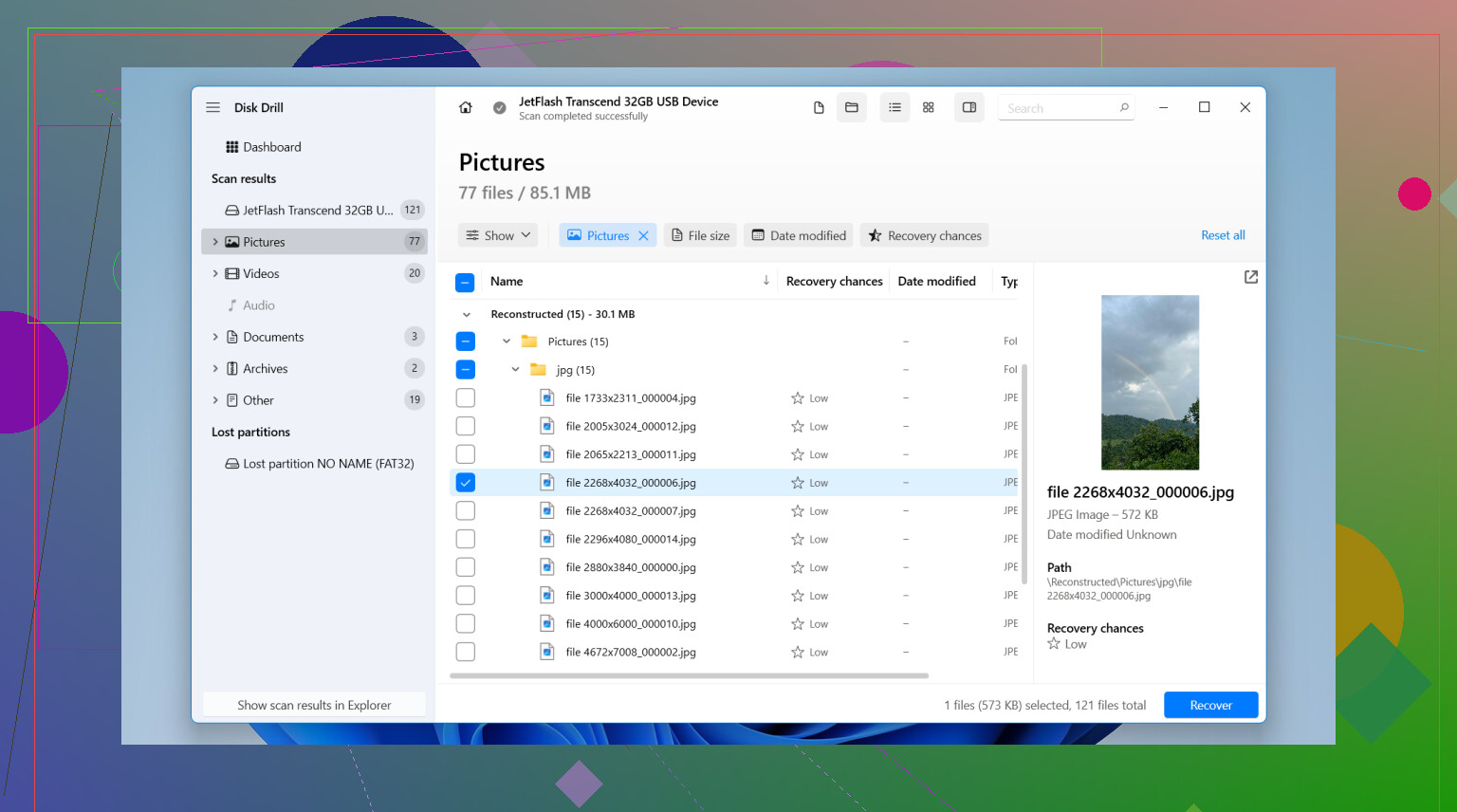
If you're on Windows and you want the easier route, I’d start with Disk Drill. The free limit is 100 MB. For a small batch of JPEGs, that’s often enough. Even if it’s not enough to restore everything, it’s useful for checking whether the Nikon files still show up in scan results.
What I did looked like this:
- Take the SD card out of the Nikon.
- Plug it into your computer with a card reader. I would not use the camera over USB for this.
- Install Disk Drill on your computer, never onto the SD card.
- Open it, pick the SD card, then hit Search for lost data.
- Run Universal Scan. In most deleted-photo cases, it finds the most.
- When the scan ends, preview what it found. This part matters, some files show up but are broken.
- Recover the photos you want.
- Save them somewhere else, your desktop, another drive, anything except the same SD card.
If your missing files go past 100 MB and you don’t want to pay, PhotoRec is the usual free answer. It works. I’ve seen people get good results with it. Still, it feels rough. No nice preview flow, filenames usually come back mangled, folders are a mess, and the interface feels old. If you’re patient, it does the job. If you want something clean, it’s not that.
One thing people miss with Nikon files. If you shot in RAW, meaning NEF, check format support before you waste time. Some free apps do fine with JPEGs and then stumble on NEF files.
Also, I’d check for copies before running scans. I found duplicates once in a transfer folder I forgot existed. Look on your PC, external drives, SnapBridge exports, cloud backups, anywhere your photos tend to land.
The short version:
- Stop using the SD card now.
- Use a card reader.
- Try Disk Drill first if 100 MB is enough.
- Use PhotoRec if you need a free option with no size limit and you don’t mind a clunky setup.
One more thing. If the card is physically damaged, throws read errors, or your computer doesn’t detect it at all, I would not keep poking at it with random tools. That’s where a recovery shop starts making more sense, esp if the photos matter.

1 Like
First move, lock the card or put it aside. Do not format it. Do not shoot one more frame. Deletion on SD cards often removes the index entry first. The image data stays until new writes hit the same blocks.
I agree with @mikeappsreviewer on stopping use fast. I disagree a bit on starting with the first scan tool you find. If these are family photos you care about, make an image of the SD card first, then work from the image. That lowers risk if the card starts throwing errors or you click the wrong thing. On Windows, USB Image Tool or Win32 Disk Imager works fine for this.
After you clone the card, scan the image file, not the original card. Disk Drill is a solid option here because it previews found photos well, which matters a lot with Nikon JPEG and NEF files. Preview support saves time. If the previews look clean, your odds are decent. If you only see generic RAW fragments, the file system took more damage.
A few Nikon-specific things people miss:
- Check the DCIM folder and also hidden folders. Some cameras leave sidecar files and weird leftovers.
- If you use SnapBridge, look in your phone gallery and app cache.
- If you shot bursts, some frames recover while others do not. That is normal.
If the card asks to be formatted, stop. If it shows 0 bytes, stop. At that point, clone first or hand it off. Family pics are worth being a bit boring and careful here, even if it feels slowww.
If you want extra reading, this thread has decent photo recovery advice from real users: urgent Reddit photo recovery recommendations for deleted camera SD card files
Don’t put the card back in the Nikon. That part I agree with from @mikeappsreviewer and @espritlibre. But I’d also avoid doing too many recovery passes with different apps right away, because people panic-click and make a mess fast.
My order would be:
- Slide the SD card’s lock switch if it has one.
- Use a separate card reader.
- Check whether the photos were ever auto-copied to your phone, PC, or cloud first. Nikon stuff sometimes ends up in random import folders.
- Run one solid scan tool, not five.
If the card is readable, Disk Drill is probly the easiest place to start because the photo preview is actually useful. That matters more than people think. If it can preview the deleted JPG or NEF files cleanly, recovery odds are usually decent. Recover to your computer, never back onto the SD card.
One thing I slightly disagree on: cloning first is ideal, sure, but if the card is healthy and you’re not super technical, some people do better with a careful direct scan than fumbling through imaging tools and clicking the wrong disk. If the card shows errors, 0 bytes, or asks to format, then yes, stop and clone or go pro.
Also, here’s a useful SD card recovery software guide with examples: see how SD card photo recovery tools actually work
If the pics are really irreplaceable, don’t “test stuff” all night. That’s how family photos turn into a forum cautionary tale.

One Nikon-specific thing I’d add that @espritlibre, @jeff, and @mikeappsreviewer only touched lightly: check whether the camera was set to RAW+JPEG or writing to a second slot/device during that shoot. A lot of people think everything is gone, but only one version was deleted or only one card got cleared.
I’d also avoid plugging the card into a phone or tablet for recovery. Phones sometimes try to “fix” storage, which is not what you want right now.
If you use Disk Drill, the good part is the preview support and easy filtering for photo types like JPG and NEF. That makes it faster to tell whether the recovery is real or just fragments. The downside is the Windows free recovery limit is small, and deep scans can return lots of cluttered results with lost filenames.
So, my take:
- check for alternate copies first
- inspect for RAW+JPEG duplicates
- recover to a different drive
- if NEF files preview badly, stop expecting perfect batch recovery
Slight disagreement with @jeff here: if these are truly once-only family shots, I lean more cautious than “just do one scan.” Even a healthy-looking card can go weird fast. If anything about the card looks abnormal, clone first, then test recovery.